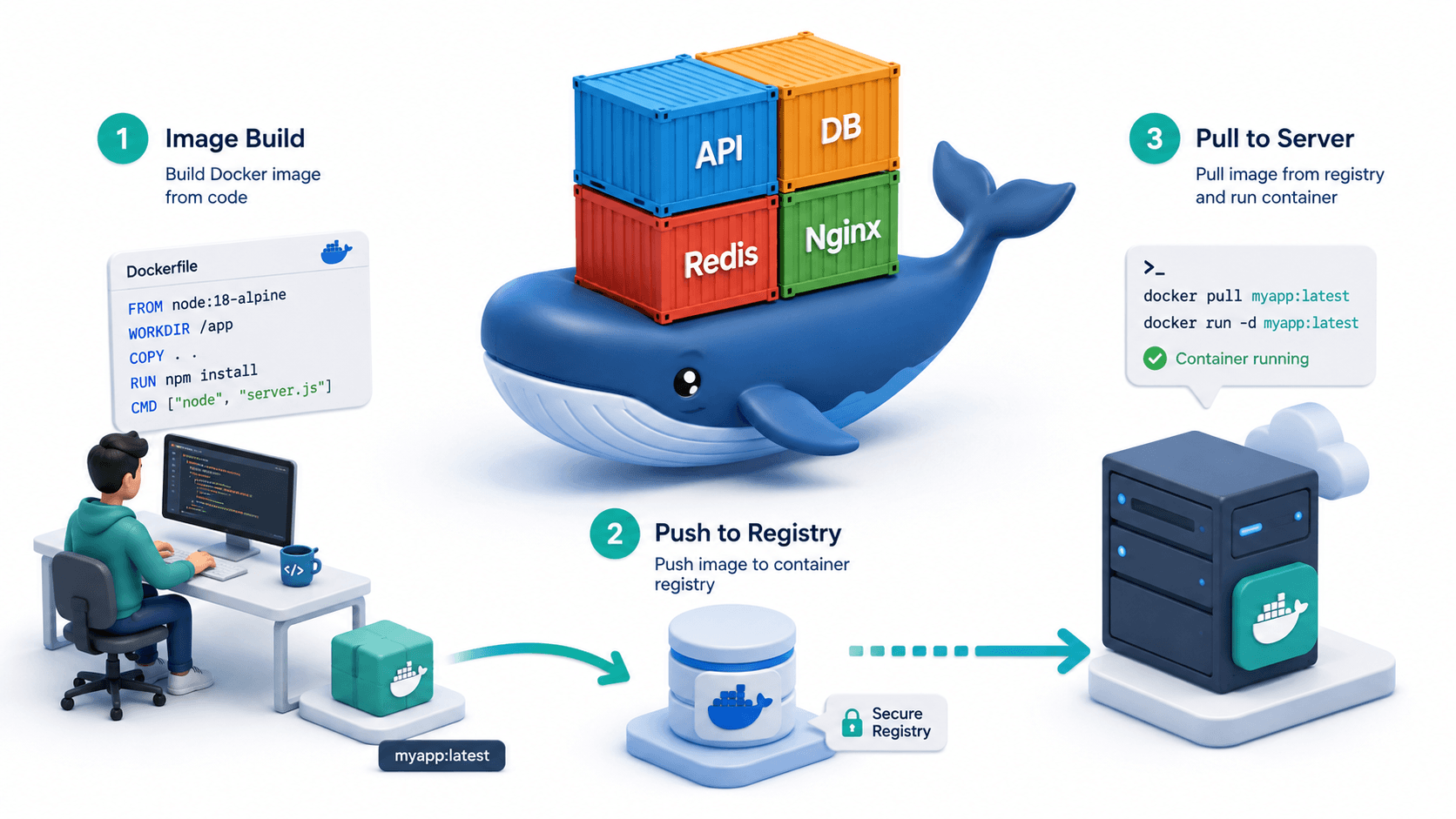
Introduction
Docker is the technology that made "it works on my machine" a solved problem. Nearly every modern backend service, API, and data pipeline runs inside Docker containers in production. Understanding Docker is not optional for any developer who builds and ships server-side software.
This guide covers Docker from first principles to production deployment. You will understand not just how to write Docker commands but why containers work the way they do - which makes everything from debugging to optimization much clearer.
What is Docker and Why Does it Exist?
Before Docker, deploying software meant:
- Manually installing the correct language runtime on each server
- Managing library versions that conflict between applications
- "It works on dev but breaks on production" because environments differ
- Scaling meant provisioning new VMs (slow, expensive, minutes to start)
Docker solves this by packaging your application together with everything it needs to run - the code, runtime, system libraries, and environment variables - into a single portable unit called a container.
Containers vs Virtual Machines
| Factor | Virtual Machine | Docker Container |
|---|---|---|
| Startup time | 1-2 minutes | Under 1 second |
| Size | Gigabytes | Megabytes |
| Isolation | Full OS per VM | Shared OS kernel, isolated process |
| Overhead | High (full OS) | Minimal |
| Portability | Limited | Run anywhere Docker is installed |
| Use case | Full OS isolation needed | Application isolation |
Containers share the host OS kernel but have their own isolated filesystem, network, and process space. This makes them dramatically lighter than VMs while still providing strong isolation.
Core Concepts
Images
A Docker image is a read-only template - a snapshot of a filesystem with a specific application and its dependencies installed. Think of it as a class definition.
Images are built in layers. Each instruction in a Dockerfile adds a layer. Layers are cached, so if only your application code changes, Docker reuses all the dependency layers and rebuilds only what changed.
Containers
A container is a running instance of an image. You can run many containers from the same image simultaneously. Think of a container as an object instantiated from a class.
Containers are:
- Ephemeral: stopping a container discards its runtime state
- Isolated: separate filesystem, network, and process namespace
- Lightweight: just a process on the host OS, not a full VM
Registry
A registry is where images are stored and shared. Docker Hub is the default public registry. Private registries (AWS ECR, Google Artifact Registry, GitHub Container Registry) store your private images.
Installing Docker
# macOS
brew install --cask docker
# Then open Docker Desktop

# Ubuntu/Debian
curl -fsSL https://get.docker.com | sh
sudo usermod -aG docker $USER
# Log out and back in
Verify installation:
docker --version
docker run hello-world
Writing Your First Dockerfile
A Dockerfile is a text file with instructions to build an image:
# Every Dockerfile starts with a base image
FROM python:3.12-slim

# Set working directory inside the container
WORKDIR /app

# Copy dependency files first (for layer caching)
COPY requirements.txt .

# Install dependencies
RUN pip install --no-cache-dir -r requirements.txt

# Copy the rest of the application code
COPY . .

# Expose the port the app runs on (documentation only)
EXPOSE 8000

# Command to run when the container starts
CMD ["uvicorn", "main:app", "--host", "0.0.0.0", "--port", "8000"]
Build and Run
# Build the image
docker build -t my-api:latest .

# Run a container
# -d: detached (background)
# -p 8000:8000: map host port to container port
docker run -d -p 8000:8000 --name my-api-container my-api:latest

# Check running containers
docker ps

# View logs
docker logs my-api-container
docker logs -f my-api-container  # stream logs live

# Stop and remove
docker stop my-api-container
docker rm my-api-container
Dockerfile Best Practices
1. Pin Your Base Image Version
# Bad - can change and break your build unexpectedly
FROM python:latest

# Good - pinned to a specific stable version
FROM python:3.12.4-slim
2. Order Instructions for Cache Efficiency
Docker caches each layer. If a layer changes, all subsequent layers are invalidated. Copy dependency files before application code:
# Good order - dependencies rarely change, code changes often
COPY requirements.txt .
RUN pip install -r requirements.txt   # Only rebuilds when requirements change
COPY . .                              # Invalidated on every code change
3. Use .dockerignore
# .dockerignore
__pycache__/
*.pyc
.env
.git
.gitignore
tests/
.pytest_cache/
node_modules/
.DS_Store
This speeds up builds and prevents secrets from accidentally ending up in the image.
4. Run as Non-Root User
FROM python:3.12-slim
WORKDIR /app
COPY requirements.txt .
RUN pip install --no-cache-dir -r requirements.txt
COPY . .

# Create a non-root user and switch to it
RUN adduser --disabled-password --gecos '' appuser
USER appuser

CMD ["uvicorn", "main:app", "--host", "0.0.0.0", "--port", "8000"]
5. Minimize Image Size
# Use slim or alpine variants
FROM python:3.12-slim     # ~150MB vs ~900MB for the full image

# Combine RUN commands to reduce layer count
RUN apt-get update && \
    apt-get install -y --no-install-recommends curl && \
    rm -rf /var/lib/apt/lists/*
Multi-Stage Builds
Multi-stage builds let you compile/install in one stage and copy only the output into a smaller final image:
# Stage 1: Builder
FROM python:3.12 AS builder

WORKDIR /build
COPY requirements.txt .

# Install into a local directory
RUN pip install --no-cache-dir --target=/build/packages -r requirements.txt

# Stage 2: Production runner
FROM python:3.12-slim AS runner

WORKDIR /app

# Copy only installed packages from builder
COPY --from=builder /build/packages /usr/local/lib/python3.12/site-packages

# Copy application code
COPY . .

RUN adduser --disabled-password appuser
USER appuser

EXPOSE 8000
CMD ["uvicorn", "main:app", "--host", "0.0.0.0", "--port", "8000"]
The final image contains no build tools or intermediate files - only what is needed to run.
Docker Compose: Multi-Container Applications
Real applications have multiple services. Docker Compose defines and runs all of them together:
# docker-compose.yml
version: '3.9'

services:

  api:
    build:
      context: .
      dockerfile: Dockerfile
    ports:
      - "8000:8000"
    environment:
      - DATABASE_URL=postgresql://postgres:password@db:5432/myapp
      - REDIS_URL=redis://redis:6379/0
    depends_on:
      db:
        condition: service_healthy
      redis:
        condition: service_started
    restart: unless-stopped

  db:
    image: postgres:16-alpine
    environment:
      POSTGRES_DB: myapp
      POSTGRES_USER: postgres
      POSTGRES_PASSWORD: password
    volumes:
      - postgres_data:/var/lib/postgresql/data
    ports:
      - "5432:5432"
    healthcheck:
      test: ["CMD-SHELL", "pg_isready -U postgres"]
      interval: 10s
      timeout: 5s
      retries: 5

  redis:
    image: redis:7-alpine
    ports:
      - "6379:6379"
    volumes:
      - redis_data:/data

  nginx:
    image: nginx:alpine
    ports:
      - "80:80"
      - "443:443"
    volumes:
      - ./nginx.conf:/etc/nginx/nginx.conf:ro
    depends_on:
      - api

volumes:
  postgres_data:
  redis_data:
Docker Compose Commands
# Start all services
docker compose up -d

# View logs
docker compose logs -f
docker compose logs -f api         # specific service

# Stop all services (keep volumes)
docker compose down

# Stop and wipe volumes (deletes database data)
docker compose down -v

# Rebuild one service
docker compose build api
docker compose up -d --no-deps api

# Open a shell in a running container
docker compose exec api bash
docker compose exec db psql -U postgres myapp
Volumes: Persisting Data
Containers are ephemeral - when stopped, filesystem changes are lost. Volumes persist data across container restarts:
# Named Volume (managed by Docker - best for databases)
docker volume create mydata
docker run -v mydata:/app/data myimage

# Bind Mount (host directory - best for development hot reload)
docker run -v $(pwd):/app myimage

# tmpfs Mount (in-memory, not persisted - best for temp secrets)
docker run --tmpfs /app/cache myimage
# Volume management
docker volume ls
docker volume inspect mydata
docker volume rm mydata
docker volume prune          # Delete all unused volumes
Networking
Services within the same Docker Compose file reach each other by service name - Docker handles DNS resolution automatically:
# Inside the 'api' container, connect to the database by service name
DATABASE_URL = "postgresql://postgres:password@db:5432/myapp"
# 'db' resolves to the database container's IP automatically
Network Types
# Bridge (default - containers communicate within a network)
docker network create mynetwork
docker run --network mynetwork myimage

# Host (container uses host networking directly - Linux only)
docker run --network host myimage

# None (no network access)
docker run --network none myimage
Publishing Ports
# Expose to all interfaces
docker run -p 8000:8000 myimage

# Expose to localhost only (safer for development)
docker run -p 127.0.0.1:8000:8000 myimage
Environment Variables and Secrets
# Pass a single variable
docker run -e DATABASE_URL=postgresql://... myimage

# Load from a .env file
docker run --env-file .env myimage
In Docker Compose:
services:
  api:
    env_file:
      - .env.production
    environment:
      - NODE_ENV=production
For sensitive values in production, use Docker secrets:
echo "supersecretpassword" | docker secret create db_password -
services:
  db:
    secrets:
      - db_password

secrets:
  db_password:
    external: true
Production Deployment Patterns
Pattern 1: Single Server with Docker Compose
For small to medium apps, deploy Docker Compose directly to a VPS:
# On the server
git clone your-repo
cd your-repo
docker compose -f docker-compose.prod.yml up -d
Use a separate docker-compose.prod.yml with no bind mounts, production env vars, and restart policies.
Pattern 2: Container Registry + Pull Deployment
# Build and push to a registry
docker build -t ghcr.io/yourorg/your-api:v1.2.3 .
docker push ghcr.io/yourorg/your-api:v1.2.3

# On the server, pull and restart
docker pull ghcr.io/yourorg/your-api:v1.2.3
docker compose up -d --no-deps api
Pattern 3: GitHub Actions Full CI/CD
# .github/workflows/deploy.yml
name: Build and Deploy

on:
  push:
    branches: [main]

jobs:
  deploy:
    runs-on: ubuntu-latest
    steps:
      - uses: actions/checkout@v4

      - name: Login to GitHub Container Registry
        uses: docker/login-action@v3
        with:
          registry: ghcr.io
          username: ${{ github.actor }}
          password: ${{ secrets.GITHUB_TOKEN }}

      - name: Build and push image
        uses: docker/build-push-action@v5
        with:
          context: .
          push: true
          tags: ghcr.io/${{ github.repository }}:latest

      - name: Deploy to server via SSH
        uses: appleboy/ssh-action@v1
        with:
          host: ${{ secrets.SERVER_HOST }}
          username: ${{ secrets.SERVER_USER }}
          key: ${{ secrets.SERVER_SSH_KEY }}
          script: |
            cd /opt/myapp
            docker compose pull
            docker compose up -d --no-deps api
            docker system prune -f
Essential Docker Commands Reference
# Images
docker images                          # List local images
docker pull nginx:alpine               # Pull from registry
docker rmi nginx:alpine                # Remove image
docker image prune                     # Remove unused images

# Containers
docker ps                              # List running containers
docker ps -a                           # List all (including stopped)
docker start/stop/restart name         # Control a container
docker rm name                         # Remove stopped container
docker rm -f name                      # Force remove running container
docker exec -it name bash              # Open shell in container
docker inspect name                    # Full details as JSON
docker stats                           # Live CPU/memory usage

# Cleanup
docker system prune                    # Remove stopped containers and unused images
docker system prune -a                 # Also remove all unused images
docker system df                       # Show disk usage
Conclusion
Docker transforms how you build, ship, and run software. By packaging your application with its entire environment, it eliminates environment inconsistencies, makes scaling trivial, and enables the CI/CD pipelines that modern engineering teams depend on.
The mental model to internalize: images are immutable blueprints, containers are running instances, volumes persist data, networks enable communication, and Docker Compose orchestrates multi-service applications. Master these five concepts and every Docker challenge becomes approachable.
Start with a simple Dockerfile for your backend API, add Docker Compose to wire it with a database, then layer in CI/CD automation. Once containerized, your application runs identically on your laptop, your team's machines, and any cloud provider in the world.
Want to containerize your backend or set up a Docker-based deployment pipeline? I build production-ready Docker setups including multi-stage Dockerfiles, Compose configurations, CI/CD pipelines, and cloud deployments. Book a meeting to modernize your deployment infrastructure.
Written by Moeen Ahmad, Senior Software Engineer working across mobile apps, backend systems, cloud deployments, and AI-powered products. I write about practical engineering, real project lessons, and building software that actually ships.
Interested in working together?
Let's discuss your project and explore how I can help bring it to life.