Introduction
In my previous guide, we explored how to quickly implement in-app purchases in Flutter apps using RevenueCat. While RevenueCat is an excellent turn-key solution for startups, scaling apps often hit a point where third-party platform costs, security regulations, or data privacy rules demand a different approach.
When your app generates high volumes of transactions, the percentage-based platform fees or active subscriber tier charges of SaaS billing gateways can turn into thousands of dollars of unnecessary monthly expenses.
The alternative is building a self-hosted, custom backend to handle receipt validation, subscription tracking, and webhook notifications directly.
In this guide, I will show you how to build a production-ready, secure custom billing backend in Python using FastAPI and PostgreSQL to validate purchases directly with the official Apple App Store Server API and Google Play Developer API.
Why Build a Custom IAP Backend?
Before writing code, let us look at the financial and operational trade-offs of building your own billing infrastructure.
RevenueCat vs. Custom Self-Hosted Backend
| Feature | RevenueCat / SaaS | Custom Self-Hosted Backend |
|---|---|---|
| Cost | Free up to $2,500/mo, then 1% of revenue or tier fee | Fixed hosting costs ($10 - $50/mo total) |
| Data Ownership | Customer billing details on third-party servers | Complete control over database records |
| Platform Commission | Stacks on top of Apple/Google 15-30% fees | None |
| Security & Compliance | Dependent on third-party policies | Custom firewalls, VPC, and data storage |
| Maintenance | None (SaaS handled) | Regular API updates required |
For businesses doing over $50,000 in monthly recurring revenue (MRR), switching to a custom backend can save $500+ every month in SaaS billing tool fees alone.
System Architecture
A custom IAP validation backend acts as the secure middle layer between your Flutter app, your database, and the App Store / Google Play billing servers.
Self-Hosted Custom IAP Flow
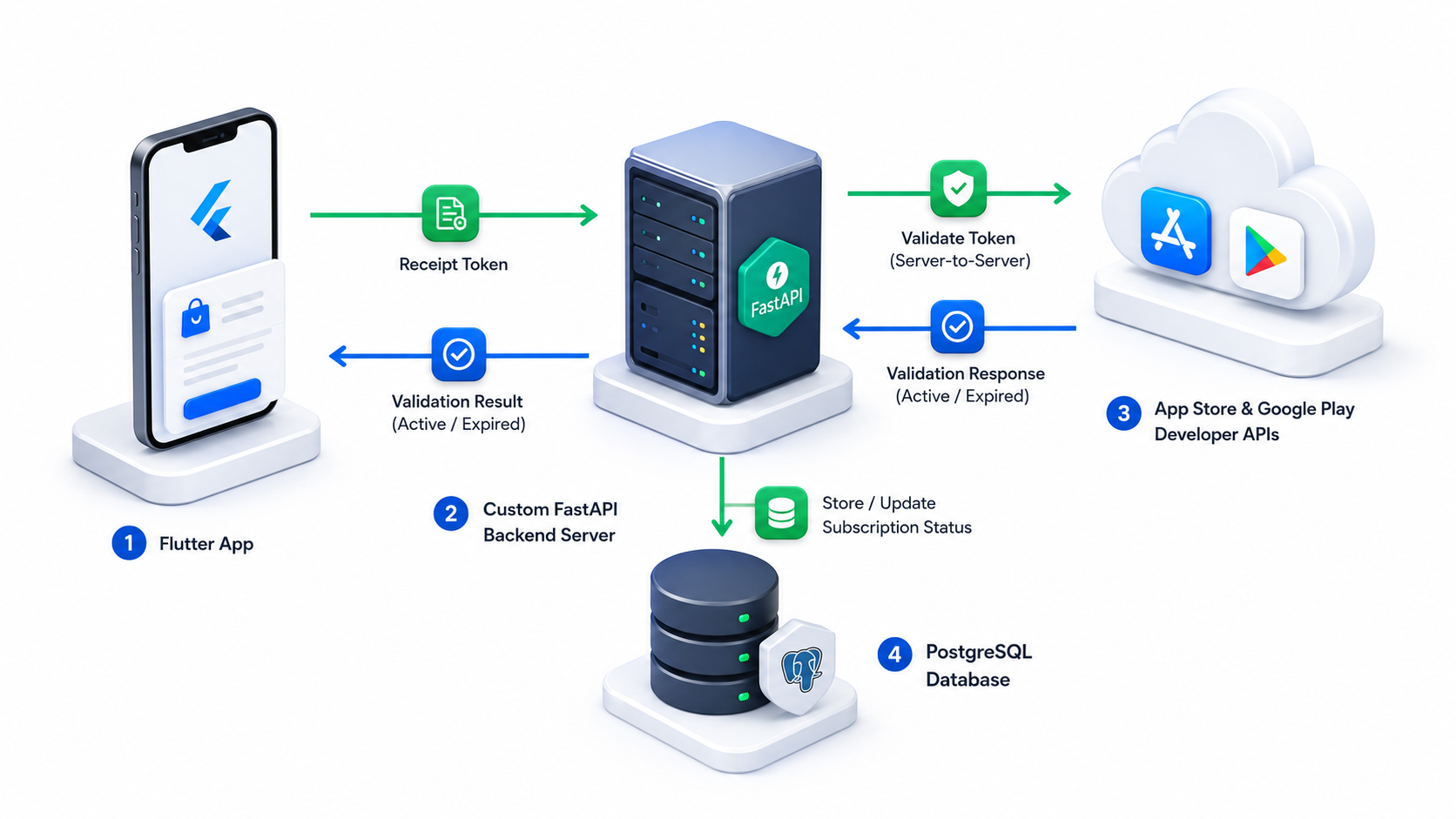
- Transaction Initiated: The user makes a purchase on their mobile device. The Flutter client receives a receipt token from the app store.
- Token Forwarding: The Flutter app sends the receipt token and purchase details to your custom FastAPI backend via a secure HTTPS request.
- External Validation: Your backend calls Apple or Google API servers with the receipt token to verify the transaction status.
- Database Write: If validated, the backend updates the user profile record in PostgreSQL, flagging them as an active premium subscriber.
- UI Unlock: The backend returns a success response to the Flutter app, unlocking premium features on the client.
Database Schema Design
We need to track user subscriptions, transaction histories, and active entitlement states. Here is a PostgreSQL table structure optimized for subscription management.
PostgreSQL Subscription Schema
-- User Profile mapping
CREATE TABLE users (
    id UUID PRIMARY KEY DEFAULT gen_random_uuid(),
    email VARCHAR(255) UNIQUE NOT NULL,
    created_at TIMESTAMP WITH TIME ZONE DEFAULT CURRENT_TIMESTAMP
);

-- Active entitlements status
CREATE TABLE user_entitlements (
    id UUID PRIMARY KEY DEFAULT gen_random_uuid(),
    user_id UUID REFERENCES users(id) ON DELETE CASCADE,
    entitlement_id VARCHAR(50) NOT NULL, -- e.g., 'premium_access'
    is_active BOOLEAN DEFAULT FALSE,
    expires_at TIMESTAMP WITH TIME ZONE,
    updated_at TIMESTAMP WITH TIME ZONE DEFAULT CURRENT_TIMESTAMP,
    UNIQUE(user_id, entitlement_id)
);

-- Transaction history logs
CREATE TABLE transaction_history (
    id UUID PRIMARY KEY DEFAULT gen_random_uuid(),
    user_id UUID REFERENCES users(id) ON DELETE CASCADE,
    platform VARCHAR(20) NOT NULL, -- 'ios' or 'android'
    transaction_id VARCHAR(100) UNIQUE NOT NULL,
    original_transaction_id VARCHAR(100) NOT NULL,
    product_id VARCHAR(100) NOT NULL,
    status VARCHAR(50) NOT NULL, -- 'ACTIVE', 'EXPIRED', 'REFUNDED'
    purchase_date TIMESTAMP WITH TIME ZONE NOT NULL,
    expiry_date TIMESTAMP WITH TIME ZONE,
    raw_payload JSONB,
    created_at TIMESTAMP WITH TIME ZONE DEFAULT CURRENT_TIMESTAMP
);
Setting Up the FastAPI Project
Let us initialize the Python project using FastAPI and install the necessary dependencies for encryption, database connections, and HTTP clients.
Dependency Manifest
Add this to a requirements.txt file:
fastapi==0.110.0
uvicorn==0.28.0
httpx==0.27.0
PyJWT==2.8.0
cryptography==42.0.5
psycopg2-binary==2.9.9
pydantic==2.6.4
Implementing App Store Server API (iOS)
Apple deprecated the old verifyReceipt endpoint in favor of the modern, secure App Store Server API. Authentication is handled using JSON Web Tokens (JWT) signed with a private key (.p8 file) generated in App Store Connect.
iOS Receipt Verification Service
Here is how to generate the signed JWT and fetch transaction details from Apple:
import time
import jwt
import httpx
from pydantic import BaseModel

class AppleConfig:
    KEY_ID = "YOUR_KEY_ID"
    ISSUER_ID = "YOUR_ISSUER_ID"
    BUNDLE_ID = "com.yourapp.bundle"
    PRIVATE_KEY_PATH = "certs/SubscriptionKey_YOUR_KEY_ID.p8"
    AUDIENCE = "appstoreconnect-v1"
    # Use sandbox for testing, buy.itunes for production
    BASE_URL = "https://api.storekit-sandbox.itunes.apple.com"

class TransactionRequest(BaseModel):
    transaction_id: str

def generate_apple_jwt() -> str:
    with open(AppleConfig.PRIVATE_KEY_PATH, "r") as f:
        private_key = f.read()

    headers = {
        "alg": "ES256",
        "kid": AppleConfig.KEY_ID,
        "typ": "JWT"
    }

    payload = {
        "iss": AppleConfig.ISSUER_ID,
        "iat": int(time.time()),
        "exp": int(time.time()) + 900, # 15 min expiry
        "aud": AppleConfig.AUDIENCE,
        "bid": AppleConfig.BUNDLE_ID
    }

    return jwt.encode(payload, private_key, algorithm="ES256", headers=headers)

async def verify_apple_transaction(transaction_id: str) -> dict:
    token = generate_apple_jwt()
    headers = {
        "Authorization": f"Bearer {token}"
    }

    # Fetch transaction details from Apple Server API
    url = f"{AppleConfig.BASE_URL}/inApps/v1/transactions/{transaction_id}"

    async with httpx.AsyncClient() as client:
        response = await client.get(url, headers=headers)

    if response.status_code != 200:
        raise Exception(f"Apple API error: {response.text}")

    # The response is a signed JWS token containing transaction details
    signed_transaction_info = response.json().get("signedTransactionInfo")

    # Decode Apple JWS payload
    decoded_payload = jwt.decode(signed_transaction_info, options={"verify_signature": False})
    return decoded_payload
Implementing Google Play Billing API (Android)
Android transaction validation requires connecting to the Google Play Developer API. Authentication is managed via a Google Cloud Service Account with Billing permissions, using a downloaded JSON key file.
Google Play Service Authentication
We authenticate with Google's OAuth2 endpoints to retrieve an access token, then query the subscription status.
import httpx
from pydantic import BaseModel

class GoogleConfig:
    CLIENT_EMAIL = "your-service-account@your-project.iam.gserviceaccount.com"
    PRIVATE_KEY = "YOUR_PRIVATE_KEY_FROM_JSON"
    PACKAGE_NAME = "com.yourapp.package"
    TOKEN_URL = "https://oauth2.googleapis.com/token"
    # Scope for Google Play Developer API
    SCOPE = "https://www.googleapis.com/auth/androidpublisher"

class GooglePurchaseRequest(BaseModel):
    subscription_id: str # SKU product ID
    purchase_token: str

async def get_google_access_token() -> str:
    # Build JWT for Google OAuth
    payload = {
        "iss": GoogleConfig.CLIENT_EMAIL,
        "scope": GoogleConfig.SCOPE,
        "aud": GoogleConfig.TOKEN_URL,
        "exp": int(time.time()) + 3600,
        "iat": int(time.time())
    }

    # Encode JWT using service account private key
    encoded_jwt = jwt.encode(payload, GoogleConfig.PRIVATE_KEY, algorithm="RS256")

    headers = {"Content-Type": "application/x-www-form-urlencoded"}
    data = {
        "grant_type": "urn:ietf:params:oauth:grant-type:jwt-bearer",
        "assertion": encoded_jwt
    }

    async with httpx.AsyncClient() as client:
        response = await client.post(GoogleConfig.TOKEN_URL, data=data, headers=headers)

    if response.status_code != 200:
        raise Exception(f"Google OAuth error: {response.text}")

    return response.json().get("access_token")

async def verify_google_subscription(subscription_id: str, purchase_token: str) -> dict:
    access_token = await get_google_access_token()

    url = (
        f"https://androidpublisher.googleapis.com/androidpublisher/v3/applications/"
        f"{GoogleConfig.PACKAGE_NAME}/purchases/subscriptions/{subscription_id}/tokens/{purchase_token}"
    )

    headers = {
        "Authorization": f"Bearer {access_token}"
    }

    async with httpx.AsyncClient() as client:
        response = await client.get(url, headers=headers)

    if response.status_code != 200:
        raise Exception(f"Google API error: {response.text}")

    return response.json()
FastAPI Routing: The Verification Endpoint
Now, let us create the FastAPI route that receives requests from the Flutter application, processes the validation logic, updates the database, and returns the active entitlement status.
Main Router Implementation
from fastapi import FastAPI, HTTPException, Depends
from datetime import datetime, timezone

app = FastAPI(title="Custom IAP Validation API")

class ValidationPayload(BaseModel):
    user_id: str
    platform: str # 'ios' or 'android'
    transaction_id: str # transaction_id for iOS, purchase_token for Android
    product_id: str # required for Android lookup

@app.post("/api/v1/iap/validate")
async def validate_purchase(payload: ValidationPayload):
    try:
        expires_at = None
        is_valid = False

        if payload.platform == "ios":
            # Call iOS verify function
            result = await verify_apple_transaction(payload.transaction_id)

            # Check transaction status (1 = Active, 2 = Expired, etc.)
            # Apple returns times in milliseconds
            exp_ms = result.get("expiresDate")
            if exp_ms:
                expires_at = datetime.fromtimestamp(exp_ms / 1000, tz=timezone.utc)
                if expires_at > datetime.now(timezone.utc):
                    is_valid = True
            else:
                # One-time purchase (non-consumable)
                is_valid = True

        elif payload.platform == "android":
            # Call Android verify function
            result = await verify_google_subscription(payload.product_id, payload.transaction_id)

            # Google returns timeMillis under expiryTimeMillis
            exp_ms = result.get("expiryTimeMillis")
            if exp_ms:
                expires_at = datetime.fromtimestamp(int(exp_ms) / 1000, tz=timezone.utc)
                if expires_at > datetime.now(timezone.utc):
                    is_valid = True

        else:
            raise HTTPException(status_code=400, detail="Invalid platform specification")

        if not is_valid:
            raise HTTPException(status_code=400, detail="Transaction has expired or is invalid")

        # Database transaction: Update user entitlements and logs
        # await db.save_subscription(payload.user_id, expires_at, payload.product_id)

        return {
            "status": "success",
            "is_premium": True,
            "expires_at": expires_at.isoformat() if expires_at else None
        }

    except Exception as e:
        raise HTTPException(status_code=500, detail=str(e))
Real-Time Webhooks (Server-to-Server Notifications)
Validating at checkout is not enough. You must set up webhooks to receive notifications when a user cancels, refunds, or fails to renew their subscription, allowing you to sync states immediately.
1. Apple App Store Server Notifications V2
Configure your server URL in App Store Connect under App Information → Server-to-Server Notifications URL. Apple sends a JWS payload using POST requests when changes occur. Decrypt the headers to confirm the payload matches Apple Certificates.
Core Apple Webhook Notification Events:
SUBSCRIBED: User purchased a new subscriptionDID_RENEW: Auto-renewal succeededEXPIRED: Subscription ran out of validityREFUND: Apple completed a user refund request
2. Google Play Real-Time Developer Notifications (RTDN)
Google routes notifications through Google Cloud Pub/Sub.
- Set up a Google Pub/Sub Topic (e.g.,
play-billing-notifications) - Configure Google Play Console to push developer events to this topic
- Implement a subscriber webhook endpoint in FastAPI to consume messages sent from Google Pub/Sub
Client Integration: Connecting the Flutter App
In your Flutter app, you bypass billing libraries like RevenueCat and make direct API requests to your custom FastAPI server after triggering native purchases.
Flutter Direct Verification Service
Add in_app_purchase to pubspec.yaml to handle native transactions:
dependencies:
  in_app_purchase: ^3.2.0
  http: ^1.2.0
Here is the Dart client logic to catch a purchase and send the receipt to your backend:
import 'dart:convert';
import 'package:http/http.dart' as http;
import 'package:in_app_purchase/in_app_purchase';

class CustomIAPService {
  final String backendUrl = 'https://api.yourdomain.com/api/v1/iap/validate';

  Future<bool> handlePurchase(PurchaseDetails purchaseDetails, String userId) async {
    // Get purchase credentials verification payload
    String transactionId = '';
    String productId = purchaseDetails.productID;

    if (purchaseDetails.verificationData.serverVerificationData.isEmpty) {
      return false;
    }

    transactionId = purchaseDetails.verificationData.serverVerificationData;
    String platform = purchaseDetails.verificationData.source; // 'local_store' or 'server'

    // Send payload to custom FastAPI endpoint
    final response = await http.post(
      Uri.parse(backendUrl),
      headers: {'Content-Type': 'application/json'},
      body: jsonEncode({
        'user_id': userId,
        'platform': platform == 'app_store' ? 'ios' : 'android',
        'transaction_id': transactionId,
        'product_id': productId,
      }),
    );

    if (response.statusCode == 200) {
      final data = jsonDecode(response.body);
      return data['is_premium'] == true;
    }

    return false;
  }
}
Security Best Practices
When building your own validation backend, security responsibility is entirely yours. Adhere to these configurations:
- JWT Signing Cryptography: Keep Apple
.p8key files and Google Cloud credential JSONs out of public repositories. Store them in secure cloud key vaults (AWS Secrets Manager, GCP Secret Manager) and load them as environment variables. - Request Rate Limiting: Implement rate-limiting middleware (like
slowapiin Python) on/validateendpoints to prevent brute-force verification scripts from overwhelming your servers. - SSL Pinning: Pin your backend API SSL certificate in the Flutter app to mitigate Man-in-the-Middle (MitM) attacks where users redirect store traffic through proxy tools to spoof server confirmations.
- Double Validate Original Transaction IDs: Cross-reference incoming transaction IDs against original transaction IDs in your logs to block replay attacks (where an attacker submits the same valid token repeatedly to unlock premium features for multiple distinct accounts).
Conclusion
Building your own self-hosted in-app purchase validation backend is an investment that pays off as your active user base grows.
To review our plan for a custom payment system:
- Design a clean PostgreSQL schema to tie platform transactions to user entitlement logs.
- Authorize Server-to-Server connections with Apple using JSON Web Tokens (JWT) and with Google using Google OAuth2 credentials.
- Handle server notifications (webhooks) to automatically capture trial conversions, cancellations, and refunds.
- Encrypt keys safely and configure rate limit defenses to secure your API endpoints.
By taking control of receipt validation, you bypass platform service fees, gain complete ownership of customer purchase logs, and lay a foundation for robust, custom enterprise-level billing management.
Looking to build a custom in-app purchase system? I build secure server-to-server receipt validation backends for App Store and Google Play billing systems without third-party fees. Book a meeting to discuss custom payment validation.
Written by Moeen Ahmad, Senior Software Engineer working across mobile apps, backend systems, cloud deployments, and AI-powered products. I write about practical engineering, real project lessons, and building software that actually ships.
Interested in working together?
Let's discuss your project and explore how I can help bring it to life.