Introduction
The Flutter Localization Guide covered how to build a multi-language Flutter app that lets users switch between English, Arabic, and Urdu. The Flutter side handles UI string translations and RTL layouts. But what about the content that comes from your backend API?
Product names, category descriptions, error messages, push notification text, and dynamic content all live in your database and API layer. If your backend always returns content in English regardless of what language the user has selected, your localized Flutter app will show a mix of translated UI strings and untranslated API content - a jarring and unprofessional user experience.
I implemented this exact pattern in BeesApp - a Saudi Arabian rewards app I developed and currently manage that serves users in both Arabic and English. Users earn rewards through store promotions using NFC and QR scanning, Face ID authentication, and a fully localized experience. Every API response, error message, and push notification respects the user's selected language.
Project Reference: BeesApp
BeesApp is a live production app available on the Apple App Store in Saudi Arabia. It features Arabic/English localization, NFC/QR scanning for reward redemption, Face ID authentication, and a FastAPI backend that powers all language-aware responses described in this guide. BeesApp is a live production app available on iOS and Android in Saudi Arabia. It features Arabic/English localization, NFC/QR scanning for reward redemption, Face ID authentication, and a FastAPI backend that powers all language-aware responses described in this guide.
This guide shows exactly how to build that system end-to-end.
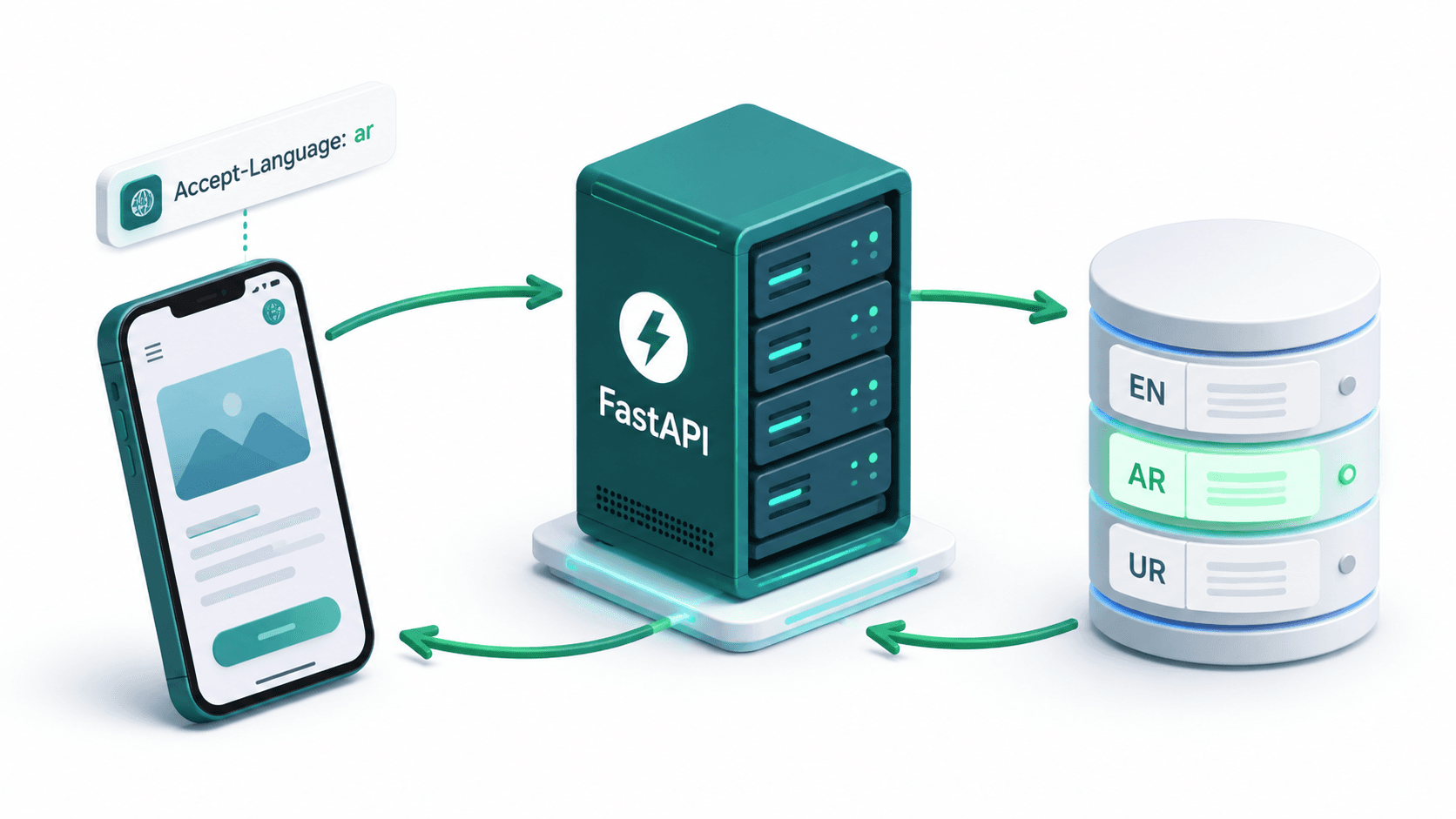
The Full Architecture
Flutter App (frontend)
   |
   | HTTP request with header:
   | Accept-Language: ar
   |
   v
FastAPI Backend
   |
   | 1. Read Accept-Language header
   | 2. Resolve language code (en / ar / ur)
   | 3. Fetch content from database
   | 4. Return localized response
   |
   v
Flutter App receives Arabic content
and displays it correctly in RTL layout
This approach keeps the backend as the single source of truth for all content and localizations, while the mobile app only manages UI string translations (button labels, form field hints, etc.).
Step 1: Database Schema for Multilingual Content
The first decision is how to store multilingual content in your database. There are two common approaches:
Approach A: Translation Columns (Simple, works for few languages)
Add a column per language directly on the entity table:
CREATE TABLE products (
    id UUID PRIMARY KEY DEFAULT gen_random_uuid(),
    sku VARCHAR(50) NOT NULL,
    price DECIMAL(10, 2) NOT NULL,
    name_en VARCHAR(255) NOT NULL,
    name_ar VARCHAR(255),
    name_ur VARCHAR(255),
    description_en TEXT NOT NULL,
    description_ar TEXT,
    description_ur TEXT,
    created_at TIMESTAMP DEFAULT NOW()
);
Pros: Simple queries, no joins needed. Cons: Adding a new language requires a schema migration. Gets messy with many languages.
Approach B: Translations Table (Scalable, recommended for production)
Use a separate translations table with a language code column:
CREATE TABLE products (
    id UUID PRIMARY KEY DEFAULT gen_random_uuid(),
    sku VARCHAR(50) NOT NULL,
    price DECIMAL(10, 2) NOT NULL,
    created_at TIMESTAMP DEFAULT NOW()
);

CREATE TABLE product_translations (
    id UUID PRIMARY KEY DEFAULT gen_random_uuid(),
    product_id UUID NOT NULL REFERENCES products(id) ON DELETE CASCADE,
    language_code VARCHAR(10) NOT NULL,  -- 'en', 'ar', 'ur'
    name VARCHAR(255) NOT NULL,
    description TEXT,
    UNIQUE (product_id, language_code)
);

-- Index for fast language lookups
CREATE INDEX idx_product_translations_lang ON product_translations(product_id, language_code);
Pros: Adding a new language is just inserting rows, no schema change needed. Clean separation of translatable content. Cons: Requires a JOIN on every query.
I used Approach B in BeesApp for scalability. The rest of this guide follows this pattern. I used Approach B in BeesApp (Android) for scalability. The rest of this guide follows this pattern.
Step 2: SQLAlchemy Models
# app/models/product.py
from sqlalchemy import Column, String, Float, ForeignKey, UniqueConstraint
from sqlalchemy.dialects.postgresql import UUID
from sqlalchemy.orm import relationship
import uuid
from app.database import Base

class Product(Base):
    __tablename__ = "products"

    id = Column(UUID(as_uuid=True), primary_key=True, default=uuid.uuid4)
    sku = Column(String(50), nullable=False, unique=True)
    price = Column(Float, nullable=False)

    translations = relationship("ProductTranslation", back_populates="product", lazy="selectin")

class ProductTranslation(Base):
    __tablename__ = "product_translations"

    id = Column(UUID(as_uuid=True), primary_key=True, default=uuid.uuid4)
    product_id = Column(UUID(as_uuid=True), ForeignKey("products.id", ondelete="CASCADE"), nullable=False)
    language_code = Column(String(10), nullable=False)
    name = Column(String(255), nullable=False)
    description = Column(String, nullable=True)

    product = relationship("Product", back_populates="translations")

    __table_args__ = (
        UniqueConstraint("product_id", "language_code", name="uq_product_language"),
    )
Step 3: Language Resolution Dependency
The core of the backend localization system is a FastAPI dependency that reads the Accept-Language header from every incoming request and resolves it to a supported language code, with fallback to English if the requested language is not supported:
# app/core/dependencies/language.py
from fastapi import Header
from typing import Optional

SUPPORTED_LANGUAGES = {"en", "ar", "ur"}
DEFAULT_LANGUAGE = "en"

def get_language(accept_language: Optional[str] = Header(None)) -> str:
    """
    Reads the Accept-Language header from the incoming request.
    Resolves it to a supported language code.
    Falls back to English if the requested language is not supported.

    Examples:
      Header: Accept-Language: ar  -> returns 'ar'
      Header: Accept-Language: ur  -> returns 'ur'
      Header: Accept-Language: fr  -> returns 'en' (not supported, fallback)
      No header                    -> returns 'en' (default)
    """
    if not accept_language:
        return DEFAULT_LANGUAGE

    # Handle complex Accept-Language values like "ar-SA,ar;q=0.9,en;q=0.8"
    # Extract the primary language code (before any region or quality factors)
    primary = accept_language.split(",")[0].split(";")[0].split("-")[0].strip().lower()

    if primary in SUPPORTED_LANGUAGES:
        return primary

    return DEFAULT_LANGUAGE
Step 4: Pydantic Schemas for Localized Responses
# app/schemas/product.py
from pydantic import BaseModel
from uuid import UUID

class ProductResponse(BaseModel):
    id: UUID
    sku: str
    price: float
    name: str          # Localized name - already resolved server-side
    description: str | None  # Localized description

    class Config:
        from_attributes = True
Step 5: The Repository Layer with Language-Aware Queries
# app/repositories/product_repository.py
from sqlalchemy.orm import Session
from sqlalchemy import select
from uuid import UUID
from app.models.product import Product, ProductTranslation

class ProductRepository:

    def __init__(self, db: Session):
        self.db = db

    def get_all_products(self, language: str) -> list[dict]:
        """
        Fetch all products with their names and descriptions
        in the requested language. Falls back to English if
        the translation for the requested language does not exist.
        """
        stmt = (
            select(Product, ProductTranslation)
            .join(
                ProductTranslation,
                (ProductTranslation.product_id == Product.id) &
                (ProductTranslation.language_code == language)
            )
        )
        results = self.db.execute(stmt).all()

        # If some products have no translation for the requested language,
        # fall back to English for those
        products_with_translation = {r.Product.id for r in results}

        # Find products missing translations
        all_products_stmt = select(Product)
        all_products = self.db.scalars(all_products_stmt).all()
        missing_ids = {p.id for p in all_products} - products_with_translation

        fallback_results = []
        if missing_ids:
            fallback_stmt = (
                select(Product, ProductTranslation)
                .join(
                    ProductTranslation,
                    (ProductTranslation.product_id == Product.id) &
                    (ProductTranslation.language_code == "en") &
                    (Product.id.in_(missing_ids))
                )
            )
            fallback_results = self.db.execute(fallback_stmt).all()

        combined = results + fallback_results
        return [self._to_dict(r.Product, r.ProductTranslation) for r in combined]

    def get_product_by_id(self, product_id: UUID, language: str) -> dict | None:
        stmt = (
            select(Product, ProductTranslation)
            .join(
                ProductTranslation,
                (ProductTranslation.product_id == Product.id) &
                (ProductTranslation.language_code == language)
            )
            .where(Product.id == product_id)
        )
        result = self.db.execute(stmt).first()

        if not result:
            # Try English fallback
            fallback_stmt = (
                select(Product, ProductTranslation)
                .join(
                    ProductTranslation,
                    (ProductTranslation.product_id == Product.id) &
                    (ProductTranslation.language_code == "en")
                )
                .where(Product.id == product_id)
            )
            result = self.db.execute(fallback_stmt).first()

        if not result:
            return None

        return self._to_dict(result.Product, result.ProductTranslation)

    def _to_dict(self, product: Product, translation: ProductTranslation) -> dict:
        return {
            "id": product.id,
            "sku": product.sku,
            "price": product.price,
            "name": translation.name,
            "description": translation.description,
        }
Step 6: FastAPI Routes
# app/routers/products.py
from fastapi import APIRouter, Depends
from sqlalchemy.orm import Session
from uuid import UUID
from typing import Annotated

from app.database import get_db
from app.core.dependencies.language import get_language
from app.repositories.product_repository import ProductRepository
from app.schemas.product import ProductResponse

router = APIRouter(prefix="/products", tags=["Products"])

@router.get("/", response_model=list[ProductResponse])
def get_products(
    db: Session = Depends(get_db),
    language: str = Depends(get_language),  # Reads Accept-Language header
):
    """
    Returns all products localized in the requested language.
    Pass Accept-Language: ar for Arabic, Accept-Language: ur for Urdu.
    Defaults to English if no header or unsupported language.
    """
    repo = ProductRepository(db)
    return repo.get_all_products(language)

@router.get("/{product_id}", response_model=ProductResponse)
def get_product(
    product_id: UUID,
    db: Session = Depends(get_db),
    language: str = Depends(get_language),
):
    """
    Returns a single product localized in the requested language.
    """
    repo = ProductRepository(db)
    product = repo.get_product_by_id(product_id, language)
    if not product:
        raise HTTPException(status_code=404, detail="Product not found")
    return product
Step 7: Localized Error Messages
Not just content - even your error messages should be localized. Create a utility for localized error strings:
# app/core/i18n/messages.py

ERROR_MESSAGES = {
    "en": {
        "not_found": "The requested resource was not found.",
        "unauthorized": "You are not authorized to perform this action.",
        "invalid_input": "The provided input is invalid.",
        "server_error": "An unexpected error occurred. Please try again.",
        "product_out_of_stock": "This product is currently out of stock.",
    },
    "ar": {
        "not_found": "المورد المطلوب غير موجود.",
        "unauthorized": "غير مصرح لك بتنفيذ هذا الإجراء.",
        "invalid_input": "المدخلات المقدمة غير صالحة.",
        "server_error": "حدث خطأ غير متوقع. يرجى المحاولة مرة أخرى.",
        "product_out_of_stock": "هذا المنتج غير متوفر حالياً.",
    },
    "ur": {
        "not_found": "مطلوبہ وسائل نہیں مل سکا۔",
        "unauthorized": "آپ کو یہ کام کرنے کی اجازت نہیں ہے۔",
        "invalid_input": "دی گئی معلومات درست نہیں ہیں۔",
        "server_error": "ایک غیر متوقع خرابی ہوئی۔ براہ کرم دوبارہ کوشش کریں۔",
        "product_out_of_stock": "یہ پروڈکٹ ابھی دستیاب نہیں ہے۔",
    },
}

def get_message(key: str, language: str) -> str:
    lang_messages = ERROR_MESSAGES.get(language, ERROR_MESSAGES["en"])
    return lang_messages.get(key, ERROR_MESSAGES["en"].get(key, key))
Use it in your routes:
from app.core.i18n.messages import get_message
from fastapi import HTTPException

@router.get("/{product_id}")
def get_product(
    product_id: UUID,
    db: Session = Depends(get_db),
    language: str = Depends(get_language),
):
    product = ProductRepository(db).get_product_by_id(product_id, language)

    if not product:
        # Error message in the user's language
        raise HTTPException(
            status_code=404,
            detail=get_message("not_found", language)
        )

    return product
Step 8: Localized Push Notifications
When sending push notifications, you need to store the user's preferred language and look it up at send time:
# app/services/notification_service.py
from app.core.i18n.messages import get_message

NOTIFICATION_TEMPLATES = {
    "en": {
        "order_shipped": {
            "title": "Your order has been shipped!",
            "body": "Order #{order_id} is on its way.",
        },
    },
    "ar": {
        "order_shipped": {
            "title": "تم شحن طلبك!",
            "body": "الطلب رقم #{order_id} في الطريق إليك.",
        },
    },
    "ur": {
        "order_shipped": {
            "title": "آپ کا آرڈر بھیج دیا گیا ہے!",
            "body": "آرڈر #{order_id} راستے میں ہے۔",
        },
    },
}

async def send_order_shipped_notification(user_id: str, order_id: str):
    # Fetch user's preferred language from DB
    user = await get_user(user_id)
    language = user.preferred_language or "en"

    templates = NOTIFICATION_TEMPLATES.get(language, NOTIFICATION_TEMPLATES["en"])
    template = templates["order_shipped"]

    await send_fcm_notification(
        token=user.fcm_token,
        title=template["title"],
        body=template["body"].replace("{order_id}", order_id),
    )
How the Flutter App Sends the Language Header
On the Flutter side, every API request includes the user's selected language code in the Accept-Language header automatically via a Dio interceptor. This is covered in detail in the companion post Flutter Localization Guide, but here is a quick recap:
// lib/core/services/dio/interceptors/language_interceptor.dart
class LanguageInterceptor extends Interceptor {
  @override
  void onRequest(RequestOptions options, RequestInterceptorHandler handler) {
    final localeProvider = GetIt.I<LocaleProvider>();

    // Attach the user's selected language to every request
    options.headers['Accept-Language'] = localeProvider.languageCode;
    // Values: 'en', 'ar', 'ur'

    super.onRequest(options, handler);
  }
}
The entire flow end-to-end:
| Step | What Happens |
|---|---|
| User selects Arabic in app | LocaleProvider.setLocale('ar') is called |
| Locale is persisted | Saved to flutter_secure_storage |
| User taps on Products | Flutter makes GET /products |
| Dio interceptor fires | Adds Accept-Language: ar header automatically |
| FastAPI receives request | get_language dependency reads header, returns 'ar' |
| Repository query runs | Joins product_translations where language_code = 'ar' |
| Response is returned | Product names and descriptions are in Arabic |
| Flutter renders | Arabic text displays in RTL layout |
Conclusion
Building a fully localized mobile product requires coordination between the frontend and the backend. The Flutter app handles UI translations, layout direction, and locale persistence. The FastAPI backend handles content localization, error message translation, and notification text.
The critical bridge between them is a single HTTP header: Accept-Language. This standard header carries the user's language preference from every mobile request to the server, allowing the backend to respond appropriately without any URL path changes or query parameters.
The patterns in this guide are production-tested from real apps serving Arabic, Urdu, and English users simultaneously. The translation table approach scales to any number of languages without schema migrations. The dependency injection pattern in FastAPI ensures the language resolution is automatic and consistent across every route in your API.
Pair this with the Flutter-side implementation in Flutter Localization: The Complete Guide and you have a complete, production-ready multilingual product architecture.
Need to build a multilingual backend for your application? I build scalable, language-aware backends using FastAPI, SQLAlchemy, and localized PostgreSQL schemas tailored to dynamic frontends. Book a meeting to discuss your backend architecture.
Written by Moeen Ahmad, Senior Software Engineer working across mobile apps, backend systems, cloud deployments, and AI-powered products. I write about practical engineering, real project lessons, and building software that actually ships.
Interested in working together?
Let's discuss your project and explore how I can help bring it to life.