Introduction
AI-powered applications are no longer experimental side projects. They are mainstream products that users expect, businesses are investing in, and engineering teams are under pressure to deliver. If you are a developer in 2026 who has not built at least one AI-powered feature or app, you are already behind.
But "AI app" is a broad term that means very different things depending on your goals. A simple chatbot that answers FAQs is an AI app. A fully agentic system that browses the web, reads documents, makes decisions, and executes multi-step workflows autonomously is also an AI app.
The tools, architecture, and effort required are vastly different.
This guide breaks down the full spectrum: from quick prototypes you can ship in a day, to scalable production AI systems I have built and deployed with real users. Based on real experience - not theory.
Nothing comes easy without dedication, consistency, and real hands-on work. Once you dive in and build things properly, you will realize - it is not magic, it is mastery.
The Two Tiers of AI App Development
Tier 1: Quick Prototypes (Days, Not Weeks)
For quick AI features or proof-of-concept demos, you do not need to build a custom backend. Two paths work well:
Firebase Genkit (AI Kit): Google's Firebase AI Kit lets you call Gemini models directly from your mobile or web app with minimal setup. It handles authentication, rate limiting, and streaming out of the box. Perfect for:
- In-app chat features
- AI-powered content generation
- Simple Q&A with a single document
Free LLM APIs with well-crafted prompts: OpenAI, Anthropic, Google, and Groq all have free or low-cost tiers. A well-engineered prompt is often worth more than a complex backend system. For simple use cases, a direct API call with a carefully constructed system prompt is all you need.
// Flutter: Direct OpenAI call for simple AI feature
import 'package:http/http.dart' as http;
import 'dart:convert';

Future<String> getAIResponse(String userMessage) async {
  final response = await http.post(
    Uri.parse('https://api.openai.com/v1/chat/completions'),
    headers: {
      'Authorization': 'Bearer $openAiApiKey',
      'Content-Type': 'application/json',
    },
    body: jsonEncode({
      'model': 'gpt-4o-mini',
      'messages': [
        {
          'role': 'system',
          'content': 'You are a helpful assistant for our Flutter app users.',
        },
        {'role': 'user', 'content': userMessage},
      ],
      'temperature': 0.7,
    }),
  );

  final data = jsonDecode(response.body);
  return data['choices'][0]['message']['content'];
}
Tier 2: Scalable Production AI Systems (Weeks, Built to Last)
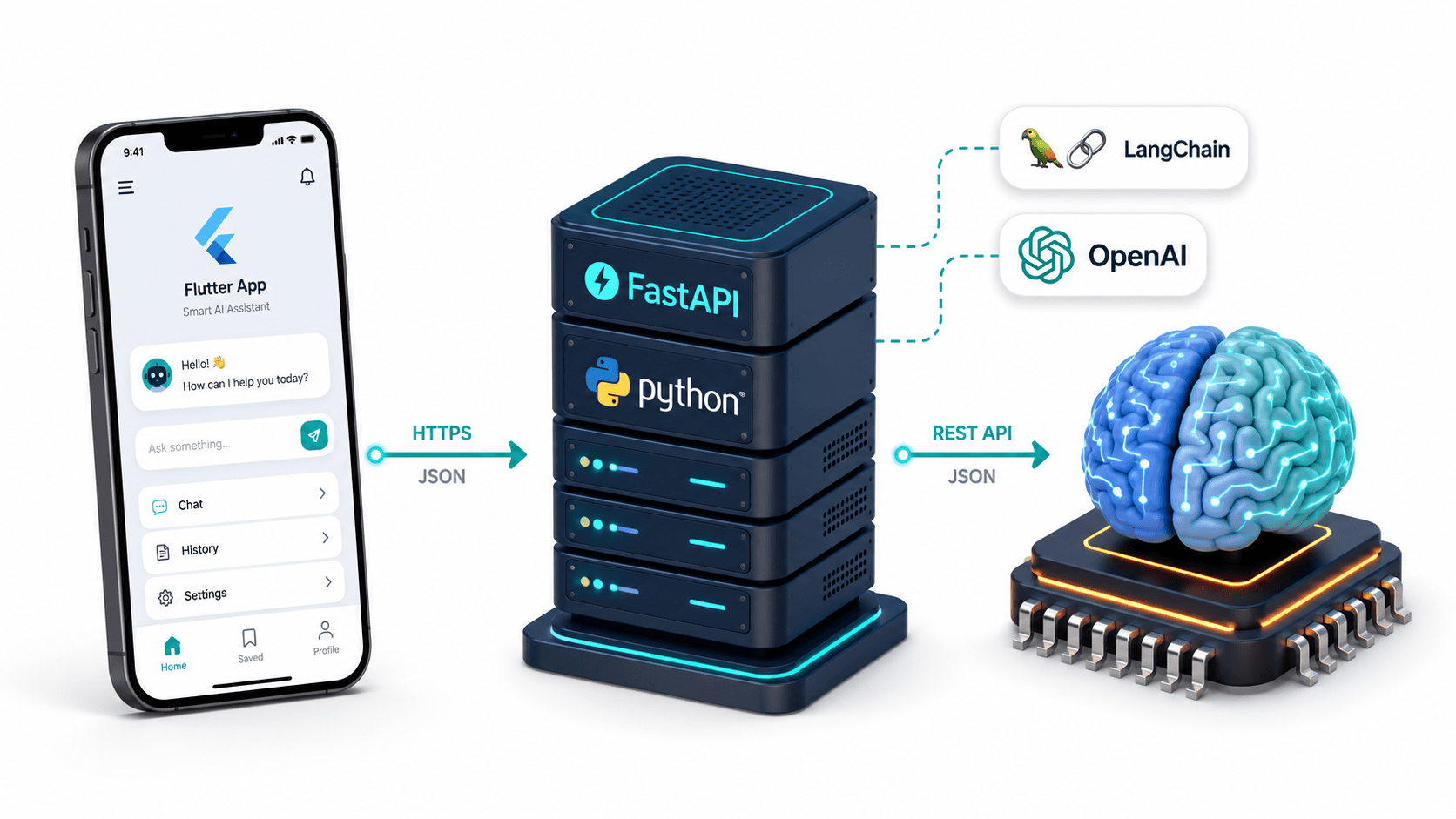
For long-term, scalable AI applications - the kind clients pay serious money for - you need to build the AI system yourself in Python and expose it as an API.
The production stack:
Python AI Backend
  ├── LangChain / LangGraph / CrewAI (AI orchestration)
  ├── FastAPI (API layer)
  ├── ChromaDB / Pinecone (vector database for RAG)
  ├── MongoDB / PostgreSQL (application data)
  └── OpenAI / Anthropic / Google (LLM)
       |
       v
       API Endpoint
       |
       v
Flutter Mobile App / Next.js Web App / Any Frontend
The Core Architecture: Python Backend + Any Frontend
The most important architectural decision is this: keep your AI logic in Python, expose it as a REST API, and call it from whatever frontend you are building.
This gives you:
- The full Python AI ecosystem (LangChain, LlamaIndex, Hugging Face, scikit-learn)
- Model swappability (switch from GPT-4 to Claude without touching the frontend)
- Independent scaling of the AI backend
- Clean separation of concerns
# FastAPI AI backend - the pattern used across all my AI projects
from fastapi import FastAPI
from pydantic import BaseModel
from langchain_openai import ChatOpenAI
from langchain_core.messages import HumanMessage, SystemMessage

app = FastAPI(title="AI Backend API")
llm = ChatOpenAI(model="gpt-4o", temperature=0.7)

class ChatRequest(BaseModel):
    message: str
    system_prompt: str = "You are a helpful AI assistant."

class ChatResponse(BaseModel):
    response: str

@app.post("/chat", response_model=ChatResponse)
async def chat(request: ChatRequest):
    messages = [
        SystemMessage(content=request.system_prompt),
        HumanMessage(content=request.message),
    ]
    response = await llm.ainvoke(messages)
    return ChatResponse(response=response.content)
Key Frameworks to Know
LangChain
LangChain is the most popular Python framework for building LLM-powered applications. It provides:
- Document loaders (PDF, web, Word, databases)
- Text splitters and chunkers
- Embedding models and vector store integrations
- Chain composition (connect multiple AI steps)
- Memory management for conversational AI
- Agent toolkits
Best for: RAG systems, chatbots, document Q&A, multi-step AI pipelines.
LangGraph
LangGraph is a LangChain extension for building stateful, multi-actor AI workflows as graphs. Instead of linear chains, you define nodes and edges - enabling loops, conditional branches, and parallel execution.
Best for: AI agents that need to make decisions, retry failed steps, or coordinate multiple specialized sub-agents.
CrewAI
CrewAI lets you define a crew of AI agents, each with a role, goal, and set of tools. Agents collaborate, delegate tasks, and produce outputs together.
from crewai import Agent, Task, Crew

researcher = Agent(
    role='Research Analyst',
    goal='Research and analyze technical topics thoroughly',
    tools=[web_search_tool, document_loader_tool],
    llm=ChatOpenAI(model="gpt-4o"),
)

writer = Agent(
    role='Technical Writer',
    goal='Write clear, accurate technical documentation',
    llm=ChatOpenAI(model="gpt-4o"),
)

research_task = Task(
    description="Research the latest developments in vector databases",
    agent=researcher,
    expected_output="Detailed research report on vector database trends",
)

writing_task = Task(
    description="Write a technical blog post based on the research",
    agent=writer,
    expected_output="Complete blog post ready for publication",
)

crew = Crew(agents=[researcher, writer], tasks=[research_task, writing_task])
result = crew.kickoff()
Best for: Complex, multi-step workflows where different AI agents specialize in different tasks.
My Open-Source AI Projects
I have built and open-sourced multiple AI systems across different use cases. You can clone any of these, adapt them to your needs, and deploy them as your own product:
RAG Systems
RAG Backend A production-ready Retrieval-Augmented Generation API backend. Built with LangChain, FastAPI, and ChromaDB. Point it at any document set and you have a Q&A system in minutes.
MamaMate AI An agentic AI system designed to support women during pregnancy - offering personalized, context-aware assistance covering mental health, gynecology, sex education, and motherhood. Built with LangChain, FastAPI, ChromaDB, MongoDB, and OpenAI. A real production-grade example of RAG + agentic workflows combined.
AI Agents
AI Therapist A conversational AI system designed to provide mental health support through guided therapeutic conversations. Demonstrates advanced prompt engineering, conversation memory, and safety guardrails.
AI Assistant with MCP Servers An AI assistant built using the Model Context Protocol (MCP) - the emerging standard for connecting AI models to external tools and data sources. Shows how to build AI systems that can interact with external services through a standardized protocol.
Computer Vision AI
Face Advisor AI An AI system that analyzes facial features and provides personalized style recommendations. Combines computer vision with LLM-powered advice generation.
Face Shape Detector AI A machine learning model that classifies face shapes (oval, round, square, heart, oblong) from photos. A focused computer vision project demonstrating model training, evaluation, and deployment.
AI Mobile Apps (Flutter)
ImageGen App A Flutter mobile app for AI image generation using DALL-E or Stable Diffusion APIs. Demonstrates how to integrate image generation AI into a polished mobile UI.
Ava Voice Assistant A Flutter-based AI voice assistant. Records audio, transcribes with Whisper, processes with GPT-4, and responds with text-to-speech. A complete voice AI pipeline in a mobile app.
The End-to-End Build Process
Here is the exact workflow I follow when building an AI-powered app from scratch:
Phase 1: Define the AI Task (Day 1)
What is the specific AI task? Classification? Generation? Retrieval? Conversation? The answer determines everything else.
- Document Q&A → RAG pipeline
- Chatbot → Conversational chain with memory
- Content generation → Prompt engineering + LLM
- Image analysis → Vision model (GPT-4V, Gemini Vision)
- Voice interface → Whisper (STT) + LLM + TTS
- Autonomous agent → LangGraph or CrewAI
Phase 2: Build the AI Core in Python (Days 2-5)
# Standard project structure for my AI backends
ai-backend/
├── app/
│   ├── core/
│   │   ├── config.py          # API keys, settings
│   │   └── dependencies.py    # FastAPI dependencies
│   ├── chains/
│   │   ├── rag_chain.py       # RAG pipeline
│   │   └── chat_chain.py      # Conversational chain
│   ├── routers/
│   │   ├── chat.py            # Chat endpoints
│   │   └── documents.py       # Document upload/indexing
│   └── models/
│       └── schemas.py         # Pydantic request/response models
├── main.py
└── requirements.txt
Phase 3: Wrap with FastAPI (Day 5-6)
Add authentication, rate limiting, error handling, and CORS for your frontend's domain.
Phase 4: Integrate in Flutter or Next.js (Days 7-10)
Create a service class that calls your AI backend:
// lib/core/services/ai/ai_service.dart
class AiService {
  final Dio _dio;

  AiService(this._dio);

  Future<String> chat(String message) async {
    final response = await _dio.post(
      '/chat',
      data: {'message': message},
    );
    return response.data['response'] as String;
  }

  Future<String> askDocument(String question, String documentId) async {
    final response = await _dio.post(
      '/query',
      data: {'question': question, 'document_id': documentId},
    );
    return response.data['answer'] as String;
  }
}
Phase 5: Deploy
- Backend: Railway, Render, AWS, or Google Cloud Run (containerized with Docker)
- Vector DB: ChromaDB on same server for small scale, Pinecone for large scale
- Mobile: App Store / Google Play
- Web: Vercel / Netlify
What Makes an AI App Actually Good
Any developer can call an LLM API. What separates a toy demo from a production AI product:
1. System prompt engineering: A well-crafted system prompt defines the AI's personality, constraints, knowledge boundaries, and output format. This is often the single highest-leverage improvement you can make.
2. Context management: LLMs have context windows. Long conversations need smart summarization or sliding window strategies to stay within limits.
3. Guardrails: Production AI systems need content filtering, input validation, output validation, and graceful degradation when the model produces unexpected output.
4. Streaming responses: Users expect to see the AI response appear word-by-word. Use streaming for any chat or generation interface.
5. Fallback strategies: What happens when the LLM is down, returns an error, or produces a flagged response? Your app needs to handle these gracefully.
Conclusion
Building AI-powered applications in 2026 is one of the most valuable skills you can develop. The demand from businesses for custom AI solutions, AI-augmented products, and fully agentic workflows is growing faster than the supply of engineers who know how to build them properly.
Start simple: call an API, build a prototype, ship something. Then go deeper: learn LangChain, build a RAG system, deploy it with FastAPI, integrate it into a mobile app.
Every AI project I have open-sourced - from the RAG Backend to MamaMate AI to Ava Voice Assistant - is something you can clone, run locally, study the code, and adapt for your own use case.
The architecture is not magic. The code is not secret. The difference between engineers who build AI products and engineers who talk about building AI products is simply the decision to start.
Want to build an AI-powered product for your business? I build custom AI backends, RAG systems, AI agents, and AI-integrated mobile apps for clients across industries. Book a meeting to discuss your project.
Written by Moeen Ahmad, Senior Software Engineer working across mobile apps, backend systems, cloud deployments, and AI-powered products. I write about practical engineering, real project lessons, and building software that actually ships.
Interested in working together?
Let's discuss your project and explore how I can help bring it to life.