Introduction
Every time a developer manually builds a release APK, signs the bundle, uploads it to TestFlight, and notifies testers over WhatsApp, they are paying a hidden tax on their engineering time. It is repetitive, error-prone, and does not scale when you have a team pushing multiple features a day.
CI/CD (Continuous Integration and Continuous Delivery) solves this by turning your entire build, test, and deployment workflow into a fully automated pipeline that triggers on every push to your repository.
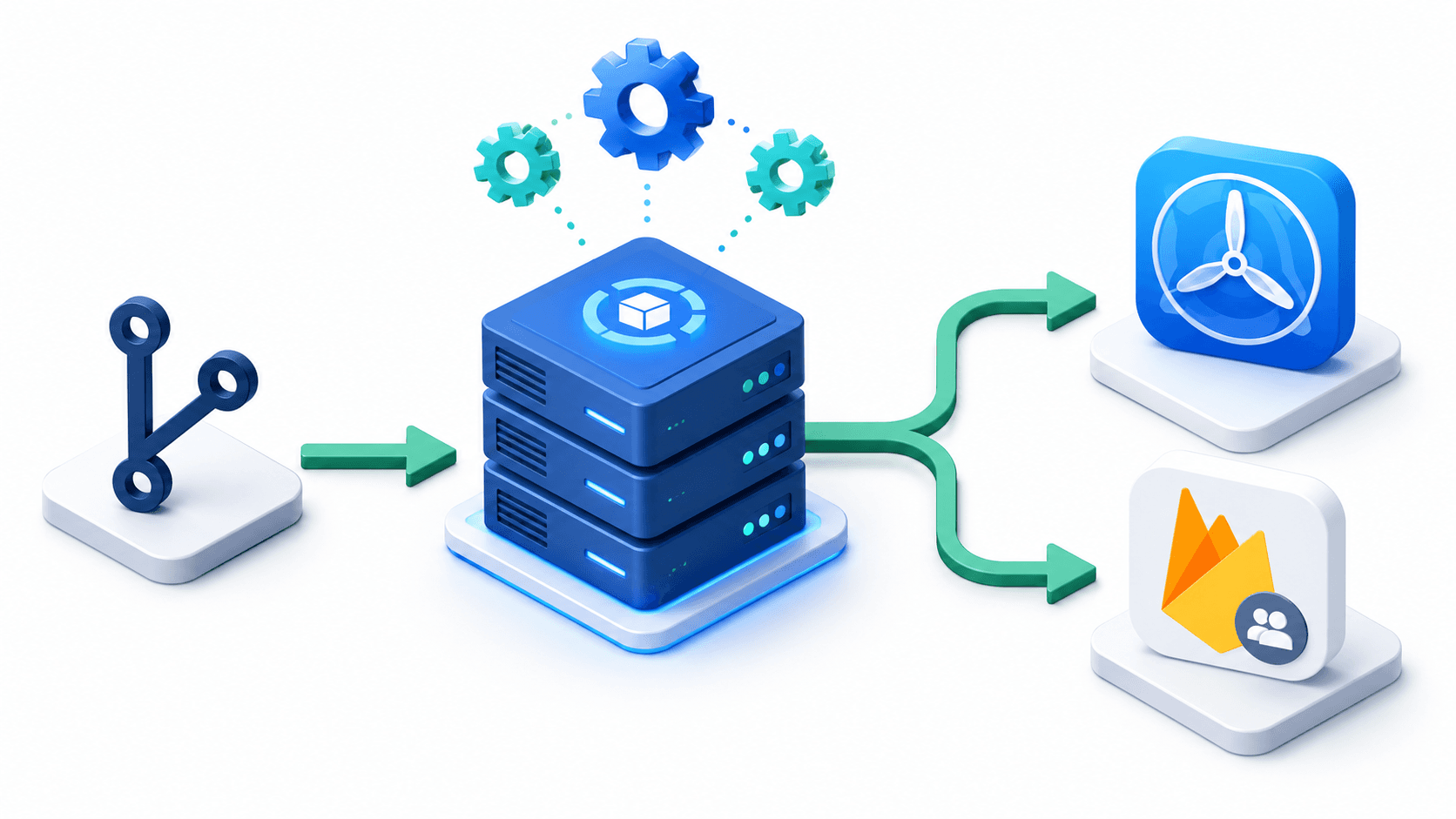
In the mobile development world, this means the moment a developer merges code into main, an automated system runs all unit tests, builds a signed release artifact, and distributes it to testers on TestFlight (iOS) or Firebase App Distribution (Android and iOS) without anyone touching a terminal.
In this guide, I will walk through what CI/CD means for mobile apps, why you need it, the two most practical tools for Flutter developers (GitHub Actions and Codemagic), and how to set up an end-to-end automated pipeline from push to distribution.
What is CI/CD and Why Mobile Teams Need It
Continuous Integration (CI) is the practice of merging all developer code changes into a shared repository frequently, and automatically verifying each change by running tests and builds.
Continuous Delivery (CD) extends this by automating the release of verified builds to testers, stakeholders, or end users.
Why Mobile Development Specifically Needs CI/CD
Mobile development has several unique challenges that make manual workflows especially painful:
Build environment fragility: iOS builds require macOS, specific Xcode versions, valid provisioning profiles, and code signing certificates. Android builds need specific SDK versions and keystore configurations. Setting this up on every developer's machine and keeping it in sync is a constant source of frustration.
Slow build times: A Flutter release build for both platforms can take 10-20 minutes. Doing this manually on your laptop blocks your machine and your productivity.
Code signing complexity: Distributing to TestFlight requires Apple Developer certificates and provisioning profiles. Getting this wrong causes distribution failures at the worst possible times.
Team coordination: Without automation, distributing a build means a developer has to stop what they are doing, build manually, and manually upload. With CI/CD, testers get a fresh build automatically within minutes of code being merged.
The CI/CD Flow for Mobile Apps
Developer pushes code to GitHub
         |
         v
CI server picks up the trigger
         |
         v
Run static analysis (flutter analyze)
         |
         v
Run unit and widget tests (flutter test)
         |
         v
Build release artifact (APK / IPA)
         |
         v
Sign the artifact (Keystore / Apple Certificates)
         |
         v
Distribute to testers
(Firebase App Distribution / TestFlight)
         |
         v
Notify team (Slack / Email)
Option 1: GitHub Actions (Free, Flexible, Code-First)
GitHub Actions is GitHub's native CI/CD platform. It allows you to define automated workflows in YAML files stored inside your repository under .github/workflows/. Every workflow is triggered by repository events like pushes, pull requests, or manual triggers.
Why GitHub Actions for Flutter?
- Free tier: 2,000 minutes per month for private repos, unlimited for public repos.
- Native GitHub integration: Directly linked to your code, pull requests, and commit history.
- Full control: Write any shell command, use any Docker image, customize every step.
- Large ecosystem: Thousands of pre-built Actions available in the GitHub Marketplace.
- Works with your existing GitHub repo: No additional service to connect.
Setting Up a Flutter CI/CD Workflow with GitHub Actions
Create a file at .github/workflows/flutter_ci.yml in your repository:
name: Flutter CI/CD Pipeline

on:
  push:
    branches: [ main, develop ]
  pull_request:
    branches: [ main ]

jobs:
  # -----------------------------------------------
  # Job 1: Run Tests (runs on every push and PR)
  # -----------------------------------------------
  test:
    name: Run Tests
    runs-on: ubuntu-latest

    steps:
      - name: Checkout repository
        uses: actions/checkout@v4

      - name: Set up Flutter
        uses: subosito/flutter-action@v2
        with:
          flutter-version: '3.24.0'
          channel: 'stable'

      - name: Install dependencies
        run: flutter pub get

      - name: Run static analysis
        run: flutter analyze

      - name: Run unit tests
        run: flutter test --coverage

  # -----------------------------------------------
  # Job 2: Build and Distribute Android (on main only)
  # -----------------------------------------------
  build_android:
    name: Build Android APK
    runs-on: ubuntu-latest
    needs: test
    if: github.ref == 'refs/heads/main'

    steps:
      - name: Checkout repository
        uses: actions/checkout@v4

      - name: Set up Flutter
        uses: subosito/flutter-action@v2
        with:
          flutter-version: '3.24.0'
          channel: 'stable'

      - name: Install dependencies
        run: flutter pub get

      - name: Decode Android Keystore
        run: echo "${{ secrets.ANDROID_KEYSTORE_BASE64 }}" | base64 --decode > android/app/keystore.jks

      - name: Build release APK
        run: flutter build apk --release
        env:
          KEYSTORE_PASSWORD: ${{ secrets.KEYSTORE_PASSWORD }}
          KEY_ALIAS: ${{ secrets.KEY_ALIAS }}
          KEY_PASSWORD: ${{ secrets.KEY_PASSWORD }}

      - name: Upload to Firebase App Distribution
        uses: wzieba/Firebase-Distribution-Github-Action@v1
        with:
          appId: ${{ secrets.FIREBASE_APP_ID_ANDROID }}
          serviceCredentialsFileContent: ${{ secrets.FIREBASE_SERVICE_CREDENTIALS }}
          groups: internal-testers
          file: build/app/outputs/flutter-apk/app-release.apk
          releaseNotes: "Build from commit ${{ github.sha }}"
Secrets Configuration
Never hardcode credentials in your YAML file. Store them as GitHub Repository Secrets (Settings - Secrets and variables - Actions):
| Secret Name | Description |
|---|---|
ANDROID_KEYSTORE_BASE64 | Base64-encoded .jks keystore file |
KEYSTORE_PASSWORD | Password for the keystore file |
KEY_ALIAS | Key alias used when generating the keystore |
KEY_PASSWORD | Password for the specific key alias |
FIREBASE_APP_ID_ANDROID | Firebase Android App ID (from Firebase Console) |
FIREBASE_SERVICE_CREDENTIALS | Firebase service account JSON contents |
Option 2: Codemagic (UI-Based, Mobile-First, Zero Config)
Codemagic is a CI/CD platform built specifically for mobile app developers. It has first-class Flutter support, a beautiful UI to configure pipelines without writing YAML, and pre-configured workflows for common mobile scenarios.
Why Codemagic for Flutter?
- Free tier: 500 build minutes per month included.
- UI-based setup: Create pipelines by clicking through a UI rather than writing YAML. Much faster to get started.
- Mobile-first: Built specifically for iOS and Android. Code signing, provisioning profiles, and App Store Connect integration are first-class features.
- macOS build machines: Codemagic provides macOS agents out of the box, which is required for building iOS apps. GitHub Actions macOS runners are significantly more expensive.
- One-click TestFlight publishing: Codemagic can submit directly to TestFlight and App Store Connect without any extra configuration.
Codemagic Workflow Setup
Connect your GitHub repository to Codemagic at codemagic.io and configure your pipeline:
1. Select your Flutter project and Codemagic auto-detects it is a Flutter app.
2. Configure build triggers (on push to main, on pull request, or manually).
3. Set up code signing using Codemagic's Code Signing Identities (upload your .p12 certificate and provisioning profile via the UI).
4. Configure distribution to TestFlight or Firebase App Distribution.
For teams that want full code control, Codemagic also supports a codemagic.yaml file in your repository:
workflows:
  flutter-release:
    name: Flutter Release Build
    max_build_duration: 60
    environment:
      flutter: 3.24.0
      xcode: latest
      cocoapods: default
      groups:
        - app_store_credentials
        - firebase_credentials

    triggering:
      events:
        - push
      branch_patterns:
        - pattern: main
          include: true

    scripts:
      - name: Install dependencies
        script: flutter pub get

      - name: Run tests
        script: flutter test

      - name: Build iOS IPA
        script: |
          flutter build ipa --release \
            --export-options-plist=/Users/builder/export_options.plist

      - name: Build Android APK
        script: flutter build apk --release

    artifacts:
      - build/ios/ipa/*.ipa
      - build/app/outputs/flutter-apk/*.apk

    publishing:
      app_store_connect:
        api_key: $APP_STORE_CONNECT_PRIVATE_KEY
        key_id: $APP_STORE_CONNECT_KEY_IDENTIFIER
        issuer_id: $APP_STORE_CONNECT_ISSUER_ID
        submit_to_testflight: true
        beta_groups:
          - Internal Testers
          - QA Team

      firebase:
        firebase_token: $FIREBASE_TOKEN
        android:
          app_id: $FIREBASE_APP_ID_ANDROID
          groups:
            - internal-testers
TestFlight vs Firebase App Distribution: Which to Use?
Both are excellent distribution platforms for getting builds to testers. The right choice depends on your team's platform focus.
| Feature | TestFlight (Apple) | Firebase App Distribution |
|---|---|---|
| Platform | iOS only | iOS and Android |
| Setup complexity | Higher (requires Apple Developer account) | Lower (Firebase project) |
| Tester onboarding | Email invite, testers install TestFlight app | Email invite, direct APK/IPA download |
| Build retention | 90 days | 120 days |
| Max testers | 10,000 external testers | Unlimited |
| Feedback collection | Built-in crash reports and screenshots | Firebase Crashlytics integration |
| App Store path | Direct path: TestFlight to App Store review | Not connected to App Store |
| Best for | iOS-focused teams shipping to App Store | Cross-platform teams and Android-first projects |
My recommendation: Use Firebase App Distribution for daily QA builds on both platforms (it is faster to set up and works for both iOS and Android). Use TestFlight when you need to share builds with a wider external beta testing group before an App Store submission.
GitHub Actions vs Codemagic: Which Should You Choose?
| Factor | GitHub Actions | Codemagic |
|---|---|---|
| Setup effort | Higher (manual YAML) | Lower (UI + templates) |
| macOS for iOS builds | Expensive (10x credit cost) | Included in free tier |
| Flutter support | Via community actions | First-class, native |
| Customization | Maximum flexibility | High, with codemagic.yaml |
| Free build minutes | 2,000/month (Linux) | 500/month (macOS) |
| Best for | Android-only pipelines or teams already deep in GitHub ecosystem | iOS/cross-platform builds and teams wanting easy setup |
Practical advice: Start with Codemagic if you are building iOS apps and want something working in under an hour. Move to GitHub Actions if you want full control, need to integrate with custom infrastructure, or are an Android-only team where macOS machines are not needed.
Setting Up Firebase App Distribution Manually
If you want to set up Firebase App Distribution without CI/CD first to understand the workflow:
# Install Firebase CLI
npm install -g firebase-tools

# Login to Firebase
firebase login

# Distribute a build manually
firebase appdistribution:distribute build/app/outputs/flutter-apk/app-release.apk \
  --app YOUR_FIREBASE_APP_ID \
  --groups "internal-testers" \
  --release-notes "Manual build for QA review"
Add testers to groups in the Firebase Console under App Distribution - Testers and Groups.
What a Real-World Mobile CI/CD Pipeline Looks Like
A production-grade pipeline for a cross-platform Flutter app typically looks like this across branches:
feature/* branch (on every push):
- Static analysis only (
flutter analyze) - Run unit tests (
flutter test) - No build artifact (fast feedback loop)
develop branch (on merge):
- Static analysis and tests
- Build debug APK
- Distribute to Firebase App Distribution (internal QA group)
- Post notification to team Slack channel
main branch (on merge, after QA sign-off):
- Static analysis and tests
- Build signed release APK and IPA
- Distribute to Firebase App Distribution (QA + stakeholder group)
- Submit iOS build to TestFlight
- Post release notes to team Slack channel
Conclusion
CI/CD transforms mobile development from a manual, fragile, individual effort into a repeatable, automated, team-wide engineering process.
By connecting your Flutter repository to GitHub Actions or Codemagic, you gain confidence that every merged commit has passed automated tests, every release build is consistently signed and packaged, and every tester always has access to the latest build without asking a developer to manually send them a file.
The setup investment is a few hours at most. The time saved over weeks and months of manual builds, uploads, and tester coordination is enormous.
Start with Codemagic if you want to get running fast, especially for iOS. Use GitHub Actions when you need maximum customization or you are already living in the GitHub ecosystem. Use Firebase App Distribution for your daily Android builds, and TestFlight for your iOS pre-release certification cycle.
Automate the boring parts so your team can focus on building features that matter.
Want to automate your mobile app deployment? I design and implement automated CI/CD pipelines using GitHub Actions, Codemagic, Fastlane, TestFlight, and Firebase App Distribution to get your builds to testers and users faster. Book a meeting to optimize your shipping flow.
Written by Moeen Ahmad, Senior Software Engineer working across mobile apps, backend systems, cloud deployments, and AI-powered products. I write about practical engineering, real project lessons, and building software that actually ships.
Interested in working together?
Let's discuss your project and explore how I can help bring it to life.