Introduction
Here is the honest truth about testing in mobile development: most developers skip it until something breaks in production. A user files a bug report. A regression slips through a code review. A hotfix breaks a feature that was working fine for months. At that point, someone always says the same thing: "We really need to write tests."
The problem is not that developers do not know testing matters. The problem is that testing feels slow, confusing, and like extra work on top of already-demanding feature delivery timelines.
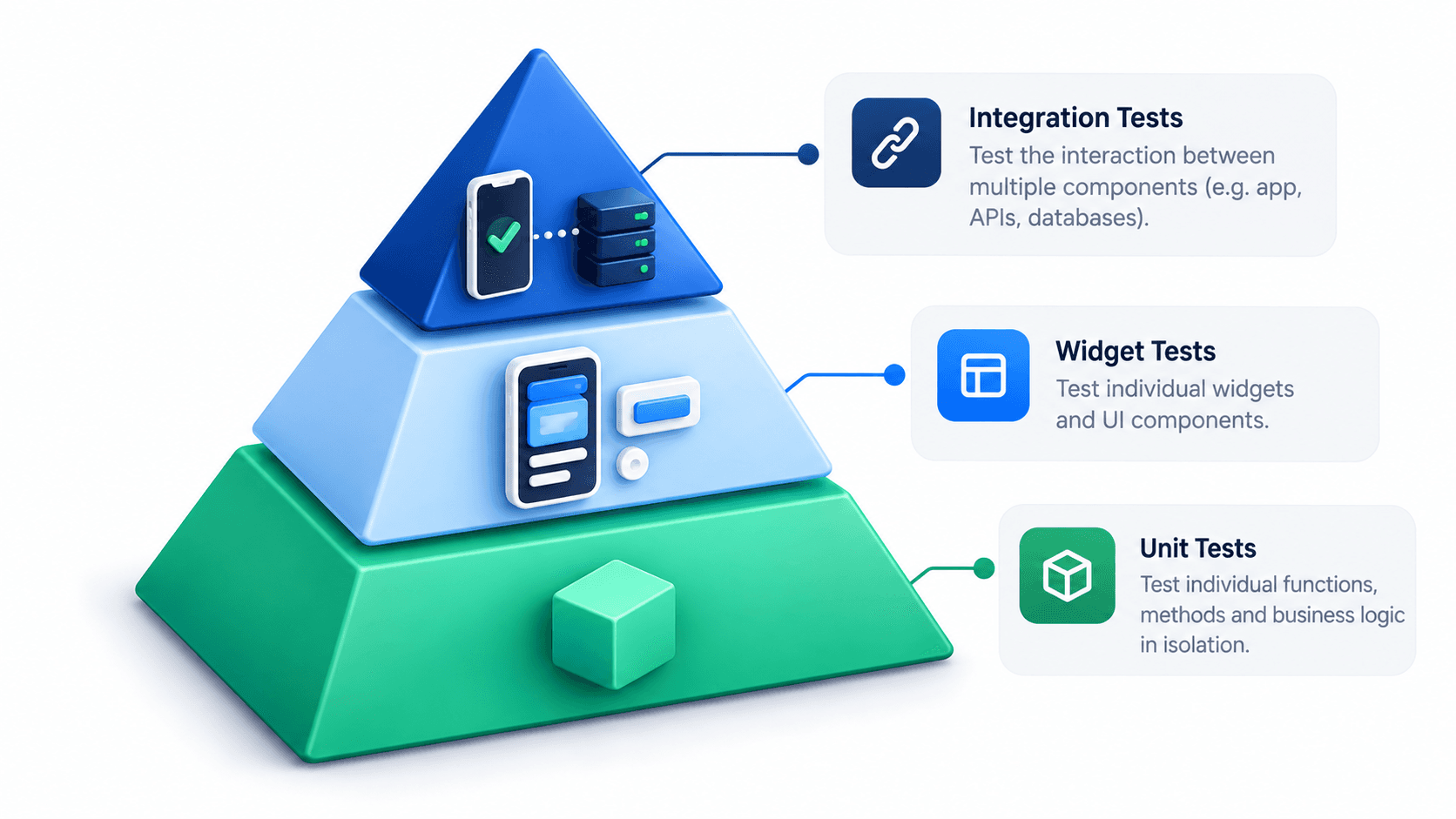
This guide is going to change your perspective. Testing in Flutter is one of the most mature and well-designed testing ecosystems in the mobile development world. The framework ships with a complete testing library out of the box. Writing tests is fast once you understand the three distinct layers and what each one is responsible for.
In this guide, I will walk you through the Flutter Test Pyramid (Unit, Widget, and Integration tests), show you real code examples for each layer, explain how to mock dependencies using Mockito, how to write Golden Tests for UI snapshots, and how to integrate testing into your CI/CD pipeline so tests run automatically on every push.
The Flutter Testing Pyramid
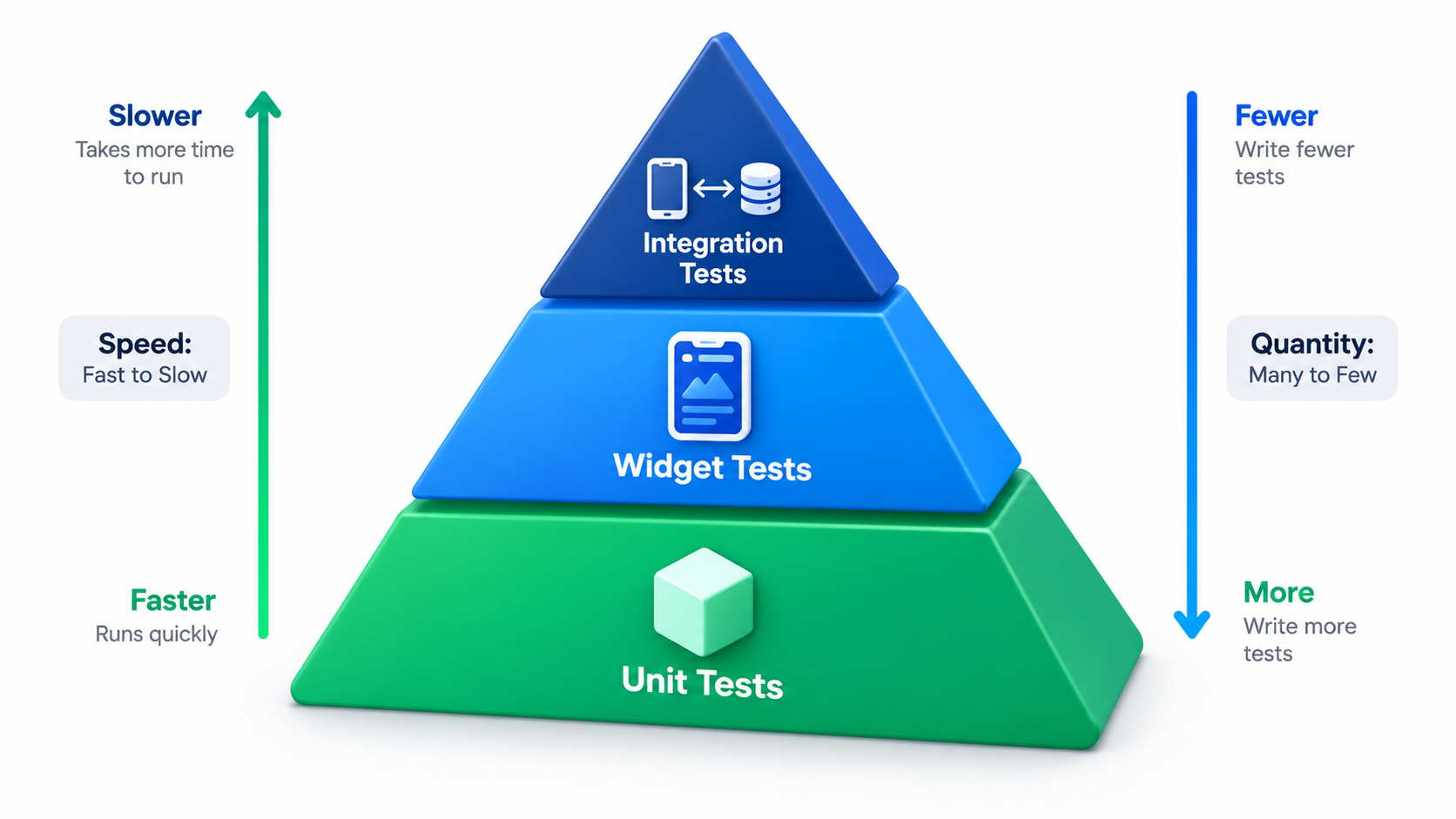
The Testing Pyramid is a mental model that helps you decide how many tests to write at each level.
| Layer | Speed | Cost | Coverage Focus | Quantity |
|---|---|---|---|---|
| Unit Tests | Fastest | Lowest | Business logic, Use Cases, Repositories | Most tests |
| Widget Tests | Medium | Medium | UI components, rendering, user interactions | Medium number |
| Integration Tests | Slowest | Highest | Full user flows end-to-end | Fewest tests |
The rule is simple: write many unit tests, a reasonable number of widget tests, and a few critical integration tests. Each layer catches different kinds of bugs. All three layers together give you high confidence that your app works correctly.
Layer 1: Unit Tests
Unit tests test the smallest isolated units of your code in complete isolation from everything else. No Flutter framework. No HTTP calls. No database. No UI.
In a Clean Architecture project, unit tests primarily target:
- Use Cases: Does the business logic execute correctly?
- Repository implementations: Does the data layer handle success and error cases correctly?
- Providers and ViewModels: Does the state update correctly when a use case completes?
- Utility functions: Do validators, formatters, and extensions return the correct values?
Unit tests run in milliseconds because they have no external dependencies. You can run hundreds of them in seconds.
Setting Up the Test Package
Flutter ships with the test package and the flutter_test package by default. For mocking dependencies, add mockito and build_runner:
# pubspec.yaml
dev_dependencies:
  test: ^1.24.0
  flutter_test:
    sdk: flutter
  mockito: ^5.4.4
  build_runner: ^2.4.9
Writing Your First Unit Test
Let us test a simple LoginUserUseCase from a Clean Architecture project:
// lib/features/auth/domain/usecases/login_user_usecase.dart
class LoginUserUseCase {
  final AuthRepository repository;

  LoginUserUseCase(this.repository);

  Future<Either<NetworkException, UserEntity>> call(
    String email,
    String password,
  ) async {
    if (!email.contains('@')) {
      return Left(NetworkException(message: 'Invalid email format'));
    }
    if (password.length < 6) {
      return Left(NetworkException(message: 'Password too short'));
    }
    return await repository.login(email, password);
  }
}
Now write the test file:
// test/features/auth/domain/usecases/login_user_usecase_test.dart
import 'package:flutter_test/flutter_test.dart';
import 'package:mockito/annotations.dart';
import 'package:mockito/mockito.dart';
import 'package:dartz/dartz.dart';

import 'package:your_app/features/auth/domain/repositories/auth_repository.dart';
import 'package:your_app/features/auth/domain/usecases/login_user_usecase.dart';
import 'package:your_app/core/entities/user_entity.dart';
import 'package:your_app/core/services/dio/dio_exceptions.dart';

// Generate the mock class automatically
@GenerateMocks([AuthRepository])
import 'login_user_usecase_test.mocks.dart';

void main() {
  late LoginUserUseCase useCase;
  late MockAuthRepository mockRepository;

  setUp(() {
    mockRepository = MockAuthRepository();
    useCase = LoginUserUseCase(mockRepository);
  });

  group('LoginUserUseCase', () {

    test('should return NetworkException when email is invalid', () async {
      // Arrange
      const invalidEmail = 'not-an-email';
      const password = 'validpassword123';

      // Act
      final result = await useCase(invalidEmail, password);

      // Assert
      expect(result.isLeft(), true);
      result.fold(
        (failure) => expect(failure.message, 'Invalid email format'),
        (_) => fail('Expected a failure but got success'),
      );
      verifyNever(mockRepository.login(any, any));
    });

    test('should return NetworkException when password is too short', () async {
      // Arrange
      const email = 'test@example.com';
      const shortPassword = '123';

      // Act
      final result = await useCase(email, shortPassword);

      // Assert
      expect(result.isLeft(), true);
      verifyNever(mockRepository.login(any, any));
    });

    test('should call repository and return UserEntity on success', () async {
      // Arrange
      const email = 'test@example.com';
      const password = 'validpassword';
      final expectedUser = UserEntity(id: '1', email: email, name: 'Test User');

      when(mockRepository.login(email, password))
          .thenAnswer((_) async => Right(expectedUser));

      // Act
      final result = await useCase(email, password);

      // Assert
      expect(result.isRight(), true);
      result.fold(
        (_) => fail('Expected success but got failure'),
        (user) => expect(user.email, email),
      );
      verify(mockRepository.login(email, password)).called(1);
    });

    test('should return failure when repository throws NetworkException', () async {
      // Arrange
      const email = 'test@example.com';
      const password = 'validpassword';

      when(mockRepository.login(email, password))
          .thenAnswer((_) async => Left(NetworkException(message: 'Server error')));

      // Act
      final result = await useCase(email, password);

      // Assert
      expect(result.isLeft(), true);
    });
  });
}
Generate the mock class by running:
dart run build_runner build --delete-conflicting-outputs
Running Unit Tests
# Run all tests
flutter test

# Run a specific test file
flutter test test/features/auth/domain/usecases/login_user_usecase_test.dart

# Run tests with coverage report
flutter test --coverage

# View coverage in terminal
genhtml coverage/lcov.info -o coverage/html
open coverage/html/index.html
Layer 2: Widget Tests
Widget tests (sometimes called component tests) test individual Flutter widgets in a lightweight, simulated environment. They do not run on a real device or emulator. Instead, Flutter provides a WidgetTester that renders widgets in memory and allows you to interact with them programmatically.
Widget tests are perfect for:
- Verifying that widgets render the correct text, icons, or colors given specific input data.
- Simulating user interactions (tap, swipe, long press, text input) and asserting the resulting UI changes.
- Testing that loading states, empty states, and error states display the correct UI.
- Ensuring that navigation is triggered correctly when a button is tapped.
Writing a Widget Test
Let us test a LoginScreen widget:
// test/features/auth/presentation/screens/login_screen_test.dart
import 'package:flutter/material.dart';
import 'package:flutter_test/flutter_test.dart';
import 'package:mockito/annotations.dart';
import 'package:mockito/mockito.dart';
import 'package:provider/provider.dart';

import 'package:your_app/features/auth/presentation/providers/auth_provider.dart';
import 'package:your_app/features/auth/presentation/screens/login_screen.dart';

@GenerateMocks([AuthProvider])
import 'login_screen_test.mocks.dart';

void main() {
  late MockAuthProvider mockAuthProvider;

  setUp(() {
    mockAuthProvider = MockAuthProvider();
    // Default: not loading, no error
    when(mockAuthProvider.status).thenReturn(AuthStatus.initial);
    when(mockAuthProvider.errorMessage).thenReturn(null);
  });

  Widget buildTestWidget() {
    return MaterialApp(
      home: ChangeNotifierProvider<AuthProvider>.value(
        value: mockAuthProvider,
        child: const LoginScreen(),
      ),
    );
  }

  group('LoginScreen', () {

    testWidgets('renders email and password fields', (WidgetTester tester) async {
      await tester.pumpWidget(buildTestWidget());

      expect(find.byKey(const Key('email_field')), findsOneWidget);
      expect(find.byKey(const Key('password_field')), findsOneWidget);
      expect(find.text('Login'), findsOneWidget);
    });

    testWidgets('shows loading indicator when status is loading', (tester) async {
      when(mockAuthProvider.status).thenReturn(AuthStatus.loading);

      await tester.pumpWidget(buildTestWidget());

      expect(find.byType(CircularProgressIndicator), findsOneWidget);
      expect(find.text('Login'), findsNothing);
    });

    testWidgets('shows error message when login fails', (tester) async {
      when(mockAuthProvider.status).thenReturn(AuthStatus.error);
      when(mockAuthProvider.errorMessage).thenReturn('Invalid credentials');

      await tester.pumpWidget(buildTestWidget());

      expect(find.text('Invalid credentials'), findsOneWidget);
    });

    testWidgets('calls performLogin with correct inputs on button tap', (tester) async {
      when(mockAuthProvider.performLogin(any, any)).thenAnswer((_) async {});

      await tester.pumpWidget(buildTestWidget());

      // Enter email
      await tester.enterText(
        find.byKey(const Key('email_field')),
        'test@example.com',
      );

      // Enter password
      await tester.enterText(
        find.byKey(const Key('password_field')),
        'password123',
      );

      // Tap login button
      await tester.tap(find.text('Login'));
      await tester.pump();

      // Verify provider method was called with correct arguments
      verify(mockAuthProvider.performLogin('test@example.com', 'password123')).called(1);
    });

    testWidgets('shows validation error for empty email', (tester) async {
      await tester.pumpWidget(buildTestWidget());

      // Tap login without entering any data
      await tester.tap(find.text('Login'));
      await tester.pump();

      expect(find.text('Email is required'), findsOneWidget);
    });
  });
}
Using find Matchers
The find object provides many useful matchers for locating widgets in the test tree:
find.text('Submit')               // Find by exact text
find.byType(ElevatedButton)       // Find by widget type
find.byKey(const Key('my_key'))   // Find by widget key (most reliable)
find.byIcon(Icons.settings)       // Find by icon data
find.descendant(                  // Find widget inside another widget
  of: find.byType(AppBar),
  matching: find.byType(Text),
)
Golden Tests: Screenshot Comparisons
Golden tests (also called snapshot tests) capture a screenshot of a widget and compare it against a stored reference image on every test run. If the widget's visual output changes, the test fails, alerting you to unexpected UI regressions.
testWidgets('ProfileCard matches golden snapshot', (tester) async {
  await tester.pumpWidget(
    MaterialApp(
      home: ProfileCard(
        name: 'Moeen Ahmad',
        role: 'Senior Software Engineer',
        avatarUrl: 'assets/avatar.png',
      ),
    ),
  );

  // Compare rendered output against stored golden file
  await expectLater(
    find.byType(ProfileCard),
    matchesGoldenFile('goldens/profile_card.png'),
  );
});
Run flutter test --update-goldens once to generate the reference screenshots. After that, every test run compares against them automatically.
Layer 3: Integration Tests
Integration tests test complete user flows on a real device or emulator. They launch the actual app, interact with the UI the same way a real user would (tap, scroll, type), and assert that the app behaves correctly from end to end.
Integration tests are the most powerful but also the slowest and most expensive to run. Keep them focused on critical user journeys:
- User registration and login flow
- Checkout or payment flow
- Onboarding flow
- Core feature flow specific to your product
Setting Up Integration Tests
Add the integration_test package to your pubspec.yaml:
dev_dependencies:
  integration_test:
    sdk: flutter
  flutter_test:
    sdk: flutter
Writing an Integration Test
Create tests in the integration_test/ directory at the project root:
// integration_test/auth_flow_test.dart
import 'package:flutter_test/flutter_test.dart';
import 'package:integration_test/integration_test.dart';
import 'package:your_app/main.dart' as app;

void main() {
  IntegrationTestWidgetsFlutterBinding.ensureInitialized();

  group('Authentication Flow', () {

    testWidgets('complete login flow navigates to home screen', (tester) async {
      app.main(); // Launch the actual app
      await tester.pumpAndSettle(); // Wait for all animations to settle

      // Verify we are on the Login screen
      expect(find.text('Welcome Back'), findsOneWidget);

      // Enter email
      await tester.enterText(
        find.byKey(const Key('email_field')),
        'testuser@example.com',
      );
      await tester.pumpAndSettle();

      // Enter password
      await tester.enterText(
        find.byKey(const Key('password_field')),
        'testpassword123',
      );
      await tester.pumpAndSettle();

      // Tap the login button
      await tester.tap(find.byKey(const Key('login_button')));
      await tester.pumpAndSettle();

      // Verify navigation to home screen
      expect(find.text('Home'), findsOneWidget);
      expect(find.text('Welcome Back'), findsNothing);
    });

    testWidgets('shows error on invalid credentials', (tester) async {
      app.main();
      await tester.pumpAndSettle();

      await tester.enterText(
        find.byKey(const Key('email_field')),
        'wrong@example.com',
      );
      await tester.enterText(
        find.byKey(const Key('password_field')),
        'wrongpassword',
      );
      await tester.tap(find.byKey(const Key('login_button')));
      await tester.pumpAndSettle();

      expect(find.text('Invalid credentials'), findsOneWidget);
    });
  });
}
Running Integration Tests
# Run on a connected device or emulator
flutter test integration_test/auth_flow_test.dart

# Run on a specific device
flutter test integration_test/ -d emulator-5554
Mocking External Dependencies
In unit and widget tests, you never want to make real HTTP calls or access real databases. You mock them out using Mockito.
The Arrange-Act-Assert Pattern
Every well-written test follows three stages:
test('description of what should happen', () async {
  // ARRANGE: Set up the preconditions and mock behavior
  when(mockRepository.getUser('user-123'))
      .thenAnswer((_) async => Right(fakeUser));

  // ACT: Execute the code being tested
  final result = await getUserUseCase('user-123');

  // ASSERT: Verify the outcome
  expect(result, Right(fakeUser));
  verify(mockRepository.getUser('user-123')).called(1);
});
Stubbing Different Scenarios
// Return a successful value
when(mockRepository.login(any, any))
    .thenAnswer((_) async => Right(fakeUser));

// Return a failure
when(mockRepository.login(any, any))
    .thenAnswer((_) async => Left(NetworkException(message: 'Timeout')));

// Throw an exception
when(mockRepository.login(any, any))
    .thenThrow(SocketException('No internet connection'));

// Return different values on consecutive calls
var callCount = 0;
when(mockRepository.fetchData())
    .thenAnswer((_) async {
      callCount++;
      return callCount == 1 ? Left(failure) : Right(data);
    });
What to Test at Each Layer: A Practical Checklist
Unit Tests - Test These
- All Use Case success paths
- All Use Case validation and error paths
- Repository implementation error handling (network errors, parse errors)
- Provider state transitions (
initialtoloadingtosuccess/error) - Form validators (email format, password length, required field rules)
- String and date formatting utilities
- Extension methods and helper functions
Widget Tests - Test These
- Widget renders correct content given props
- Loading, empty, and error state UI displays
- Button taps invoke the correct provider method
- Navigation occurs when expected
- Form validation messages appear on invalid input
- Responsive layouts on different screen sizes
Integration Tests - Test These
- User registration end-to-end
- User login and logout end-to-end
- Core product feature flow (the critical happy path)
- Deep link navigation
- Notification tap handling
Test Coverage: How Much is Enough?
Coverage is a metric that measures what percentage of your code lines are executed by tests. It is useful but should not be your primary goal.
# Generate coverage data
flutter test --coverage

# Convert to HTML report
genhtml coverage/lcov.info -o coverage/html

# Open in browser
open coverage/html/index.html
A common target is 80% test coverage for production apps. However, focus coverage on the areas that matter most:
- 100% coverage on Use Cases (critical business logic, easy to test in isolation)
- High coverage on Repository implementations (data layer errors)
- Reasonable coverage on Provider/ViewModel state logic
- Widget tests for every screen's core states (loading, error, success, empty)
Do not chase 100% coverage by writing meaningless tests for trivial getters and constants. A thoughtful 75% is worth far more than a mechanical 95% that only tests happy paths.
Integrating Tests into Your CI/CD Pipeline
Tests only provide real value when they run automatically on every code change. Add these steps to your GitHub Actions or Codemagic pipeline:
# In your GitHub Actions workflow
- name: Run static analysis
  run: flutter analyze

- name: Run unit and widget tests with coverage
  run: flutter test --coverage

- name: Upload coverage to Codecov
  uses: codecov/codecov-action@v3
  with:
    file: coverage/lcov.info
    fail_ci_if_error: true
    minimum_coverage: 75
With this setup, any pull request that breaks existing tests or drops coverage below 75% is automatically blocked from merging.
Conclusion
Testing is not optional in production mobile development. It is the engineering discipline that separates teams who ship fast and confidently from teams who are always firefighting regressions.
The Flutter testing ecosystem makes this genuinely accessible:
- Unit tests run in milliseconds and cover your core business logic. They are the backbone of your test suite. Write many of them, especially for use cases, repositories, and providers.
- Widget tests give you confidence that your UI components render and behave correctly without needing a device. They are faster than integration tests and more realistic than unit tests.
- Integration tests validate complete user flows on a real device. Keep them focused on the most critical paths: login, checkout, onboarding, and your core product feature.
Together, these three layers form a safety net that catches bugs before they reach your users, gives you confidence to refactor code without fear, and speeds up your team over time because you spend less time debugging production issues.
Start with a single unit test for your most critical use case. Then add a widget test for your most used screen. Then wire tests into your CI/CD pipeline. Build the habit gradually, and within a few weeks your test suite becomes one of your most valuable engineering assets.
Want to eliminate bugs and write automated tests for your app? I implement robust testing frameworks covering Unit, Widget, Golden, and integration tests to guarantee codebase stability. Book a meeting to set up automated testing for your app.
Written by Moeen Ahmad, Senior Software Engineer working across mobile apps, backend systems, cloud deployments, and AI-powered products. I write about practical engineering, real project lessons, and building software that actually ships.
Interested in working together?
Let's discuss your project and explore how I can help bring it to life.