Introduction
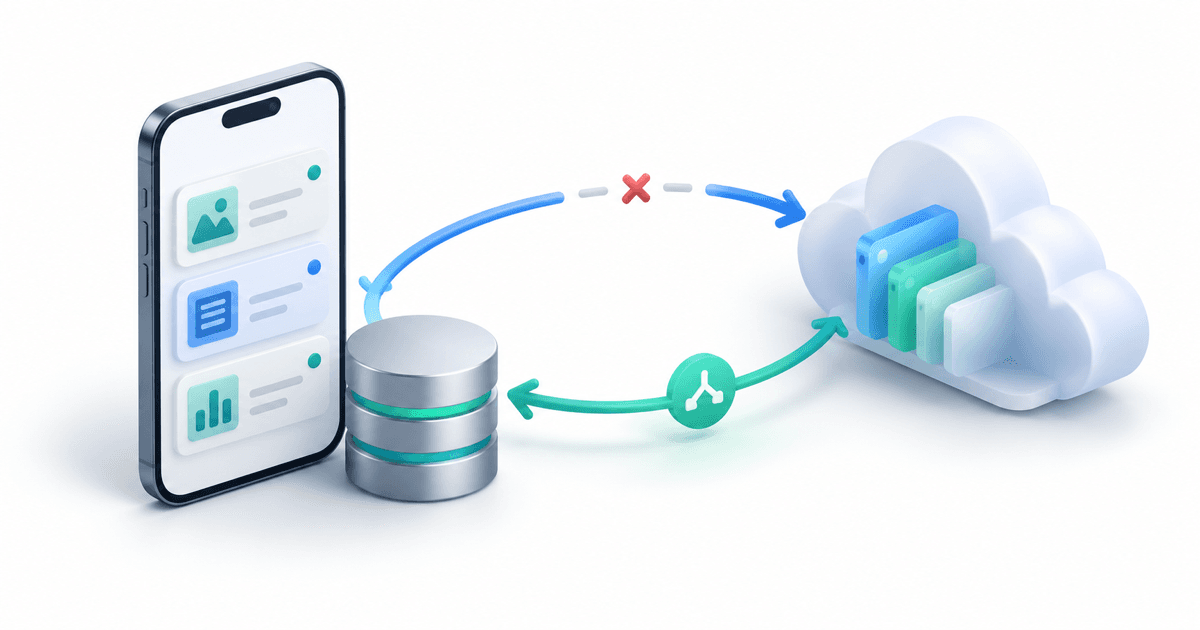
An offline-first app lets someone make useful progress without a reliable connection, then moves those changes to the server when a connection returns. The difficult part is not caching a screen. It is making sure an edit survives an app restart, a timed-out request, and a second device editing the same record.
This guide is for Flutter engineers building editable data such as field notes, inspections, or task lists. It assumes a Flutter app with a local SQLite database and an API you control. The architecture follows Flutter's offline-first repository guidance. The standalone Dart sync loop below was checked with Dart 3.13.2; the SQLite adapter, HTTP transport, and app lifecycle still need integration tests in your own project.
The GPS tracking guide already discusses buffering location packets when a vehicle loses coverage. Editable records are different: two people can change the same record, and neither change should silently disappear.
Decide What Must Work Offline
Do not make every action offline-capable by default. A field worker should be able to save an inspection note without signal. A payment or a shared inventory reservation may require server confirmation before the app can promise success.
| Action | Offline behavior | User-facing state |
|---|---|---|
| Read a previously opened note | Read the local copy | Show when it was last synchronized |
| Edit a note | Save locally and queue the change | Show “Saved on this device” until confirmed |
| Create a payment | Require an online response | Never label it complete before confirmation |
| Resolve a conflicting edit | Keep both versions available | Ask for a choice or apply an explicit merge rule |
This distinction prevents an interface from saying “saved” when it only means “the server might receive this later.”
Use One Local Source of Truth
Let the Flutter UI read from the local database. A repository owns local writes and synchronization; widgets should not decide whether to read from the network. Flutter recommends repositories as the access point that combines local and remote data, and its SQLite recipe shows how to persist records on the device.
For a note, store both the visible content and the server version on which the next edit is based. Store pending operations in a separate outbox:
CREATE TABLE notes (
  id TEXT PRIMARY KEY,
  body TEXT NOT NULL,
  server_version INTEGER NOT NULL DEFAULT 0,
  sync_status TEXT NOT NULL DEFAULT 'synced'
);

CREATE TABLE outbox (
  operation_id TEXT PRIMARY KEY,
  note_id TEXT NOT NULL REFERENCES notes(id),
  base_version INTEGER NOT NULL,
  body TEXT NOT NULL,
  created_at INTEGER NOT NULL
);
When the user saves, update the note and insert its outbox operation in one database transaction. If the app closes after that transaction, both the visible edit and the work needed to upload it still exist. For a newly created note, insert it rather than updating an absent row. The SQL schema is a small demonstration, not a complete migration or account-isolation design.
BEGIN;
UPDATE notes
SET body = :body, sync_status = 'pending'
WHERE id = :note_id;
INSERT INTO outbox (operation_id, note_id, base_version, body, created_at)
VALUES (:operation_id, :note_id, :base_version, :body, :created_at);
COMMIT;
Use a stable, unique operation ID for each request. The server should remember a completed operation ID and return the same outcome if the phone repeats it after a timeout. A timeout does not prove the server failed: it may have committed the edit before the response was lost.
Push Changes Through a Small State Machine
The sync worker should distinguish a successful push, a conflict, and a retryable failure. Here is the coordination core; your SQLite and HTTP classes implement the interfaces. Process a note's operations in order, and keep the outbox row until the local acknowledgement transaction succeeds.
class PendingChange {
  final String operationId;
  final String noteId;
  final String body;
  final int baseVersion;

  const PendingChange(this.operationId, this.noteId, this.body, this.baseVersion);
}

sealed class PushResult {}
final class Accepted extends PushResult {
  final int serverVersion;
  Accepted(this.serverVersion);
}
final class Conflict extends PushResult {
  final String serverBody;
  final int serverVersion;
  Conflict(this.serverBody, this.serverVersion);
}
final class RetryLater extends PushResult {}

abstract interface class LocalOutbox {
  Future<PendingChange?> nextPending();
  Future<void> acknowledge(String operationId, int serverVersion);
  Future<void> saveConflict(String operationId, String serverBody, int serverVersion);
}

abstract interface class NotesApi {
  Future<PushResult> push(PendingChange change);
}

Future<void> syncOnce(LocalOutbox local, NotesApi api) async {
  while (true) {
    final change = await local.nextPending();
    if (change == null) return;
    final reply = await api.push(change);
    switch (reply) {
      case Accepted(:final serverVersion):
        await local.acknowledge(change.operationId, serverVersion);
      case Conflict(:final serverBody, :final serverVersion):
        await local.saveConflict(change.operationId, serverBody, serverVersion);
        return; // Do not upload later edits on top of an unresolved conflict.
      case RetryLater():
        return; // Keep the outbox row for the next attempt.
    }
  }
}
The HTTP adapter should map a network timeout or a temporary server error to a later retry, with bounded exponential backoff and jitter. It must not treat every 4xx response as retryable. Your local implementation of acknowledge must check the operation ID before deleting an outbox row: a user could make a newer edit while an older request is in flight. Never overwrite that newer edit with an older server response. If several edits to one note are queued, acknowledge and rebase the next unsent edit to the newly returned server version inside one transaction. Fetching the next operation after each acknowledgement avoids sending a stale snapshot of the queue.
Run synchronization when the app starts, after a local edit, and when connectivity appears to return. Connectivity is only a hint; the request itself establishes whether the server is reachable. Background execution rules differ across Android and iOS, so a periodic job alone cannot be your only recovery path.
Give the Server an Explicit Conflict Contract
Send the operation ID, note ID, body, and base version together. The server can atomically update only when the stored version matches the base version:
UPDATE notes
SET body = :body, version = version + 1
WHERE id = :note_id AND version = :base_version;
If no row was updated, fetch the current server version and return a conflict response. If the operation ID has already been processed, return its recorded earlier result instead of applying the edit twice. Keep the idempotency record and the note update in the same server transaction. Define how long that record remains available, since a mobile device may retry much later.
For simple personal notes, an explicit “keep mine / use server version” decision can be safer than an automatic merge. For collaborative forms, field-level merging may be possible, but it needs product rules: two edits to the same address field cannot be resolved reliably by whichever clock appears latest. Server-assigned versions avoid trusting device clocks.
Test the Failures That Matter
Use the Flutter testing guide for unit, widget, and integration-test structure. Then add a sync-specific matrix:
| Test | Expected result |
|---|---|
| Save while offline, force-close, reopen | The edited note and outbox operation remain |
| Server commits, response is lost, phone retries | The same operation is applied once |
| Two devices edit version 4 | One succeeds; the other gets a visible conflict |
| Retry receives a permanent validation error | The app stops automatic retries and explains the problem |
| User edits again while a push is in flight | The later local edit is not overwritten |
| User signs out or changes accounts | Queued data cannot leak into the next account |
For database and API boundaries, the clean architecture guide shows how to keep storage, network, and UI responsibilities separate. The key outcome is straightforward: every locally accepted edit either reaches the server, remains visibly pending, or asks the user to resolve a conflict. It never vanishes without explanation.
Conclusion
Build offline-first behavior around durable local writes and an explicit synchronization contract. A local database makes an edit survive a restart; an outbox makes pending work recoverable; operation IDs make retries safe; and server versions make conflicts visible.
Start with one editable feature, test the failure cases above, and only then extend the pattern to the rest of the app. Offline support is complete when users can trust what the app says happened to their work.
Building a mobile product for people who cannot rely on constant connectivity? I help teams design Flutter apps and backends that preserve user work through network failures. Book a meeting to review your sync architecture.
Interested in working together?
Let's discuss your project and explore how I can help bring it to life.